Prompt Caching for AI Agents: Stop Breaking Your Own Cache
LLM APIs re-read the whole conversation on every call. How the prefix cache works, the bugs that silently switch it off, and the append-only rule that fixes them.
Here's a quick audit worth running before you read further. Pull the usage object from your last hundred LLM calls and work out what fraction of input tokens came from the cache.
def cache_hit_rate(usage) -> float:
    """Anthropic Messages API: share of input tokens served from cache."""
    cached = usage.cache_read_input_tokens or 0
    written = usage.cache_creation_input_tokens or 0
    fresh = usage.input_tokens or 0          # uncached tokens after the last breakpoint
    total = cached + written + fresh
    return cached / total if total else 0.0

# OpenAI Responses API equivalent:
#   usage.input_tokens_details.cached_tokens / usage.input_tokens
If you're running a multi-turn agent with a long, stable system prompt and that number is near zero, your code is almost certainly breaking the cache on every call. If you don't log it at all, that's the first finding.
This post covers why the number matters, the one rule that decides it, and the specific code patterns that quietly drive it to zero, including one that makes your bill go up while your token count goes down.
Why every call re-reads everything
Chat-style LLM APIs are stateless. OpenAI's conversation-state guide describes each generation request as independent; multi-turn "memory" exists because your code re-sends earlier messages. Even when you chain responses with previous_response_id, OpenAI bills every earlier input token in the chain as input. The server stores history for you. The model still reads it.
For an agent, this dominates cost. Each tool call is a new request carrying the full history, so if every step appends a similar amount of text:
step n reads roughly n times what step 1 read
total input across a session grows with the square of the step count
In a write-up on building the Manus agent, Yichao "Peak" Ji reported an average input-to-output token ratio of about 100:1. Agents mostly read, so the price of reading is the price of the agent. (New to tokens? AI Can't Count the R's in Strawberry covers what you're actually paying for.)
How the prefix cache works
A decoder-only language model processes tokens in order. The internal state for each token (the key-value tensors that providers cache) is computed in the context of every token before it. Providers save that work and reuse it on the next request.
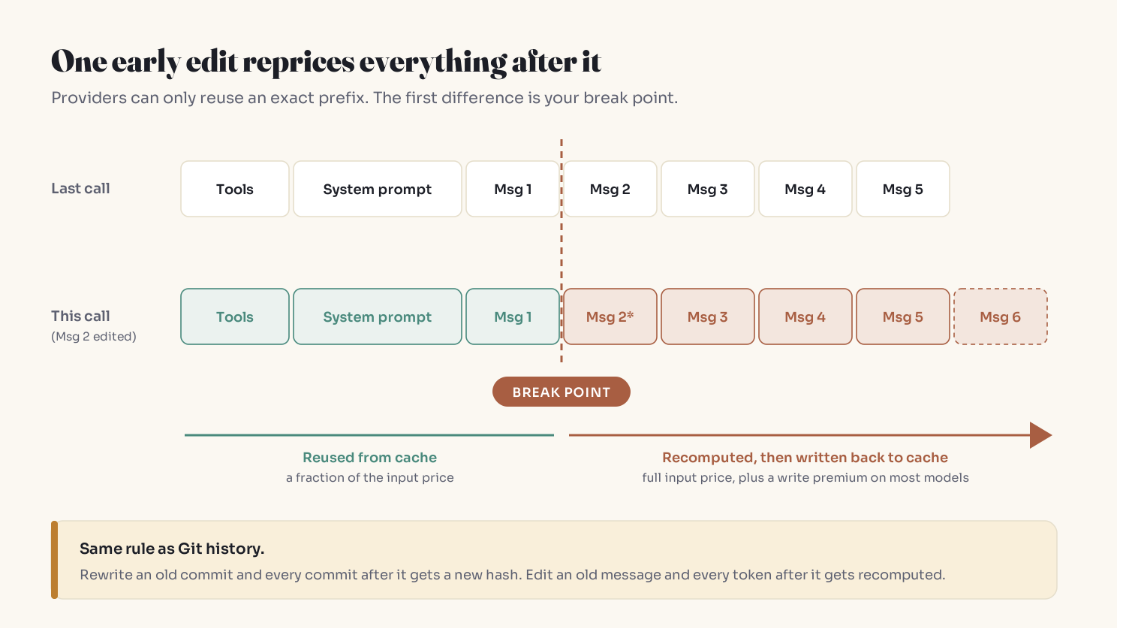
The catch is in the same sentence. The state for token 5,000 depends on tokens 1 to 4,999. Change token 300 and every saved state after it is invalid. So a provider can only reuse an exact prefix: the longest run from the start of the prompt that's byte-identical to a previous request.
Git users already know this rule: rewrite an old commit and every commit after it gets a new hash.
Pricing at the time of writing (check your provider's page; it changes):
| Anthropic (docs) | OpenAI, newest models (docs) | |
|---|---|---|
| Cache write | 1.25× input (5-min TTL), 2× (1-hour TTL) | 1.25× input |
| Cache read | 0.1× input on many models, lower on some newer ones | 0.1× input |
| Lifetime | 5 min default, refreshed on each use | at least 30 min after last write or reuse |
| How to enable | explicit cache_control breakpoints or automatic mode |
automatic |
Caching doesn't change outputs. Anthropic's docs state responses are identical either way; only cost and time-to-first-token change.
The break point: the cost model in one sentence
Every request has a break point, the first byte that differs from what the cache has seen. Before it: discounted. After it: full price, plus a write premium on many current models.
So the number of tokens you send isn't the whole story. Where your first change lands decides how much of the prompt you pay for twice. Here's the arithmetic on an 80,000-token conversation, fully cached from the last call, with 1,000 new tokens arriving (write 1.25×, read 0.1×):
| Next call | Cached reads | Recomputed and written | Cost (full-price token equivalents) |
|---|---|---|---|
| Leave history alone | 80,000 × 0.1 = 8,000 | 1,000 × 1.25 = 1,250 | ≈ 9,250 |
| Delete a 5,000-token tool result at position 20,000 | 20,000 × 0.1 = 2,000 | 56,000 × 1.25 = 70,000 | ≈ 72,000 |
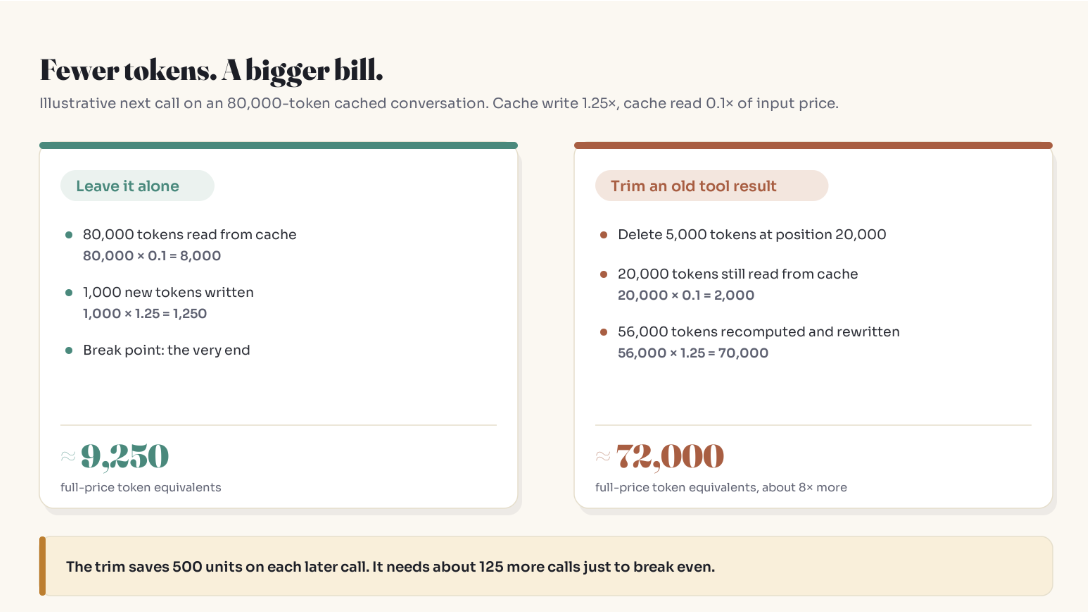
A smaller prompt, roughly 8× the cost (around 6× even with no write premium). The trim saves about 500 units on each later call, so it needs around 125 more calls to break even.
The fix is timing, not abstinence. Shrink tool output before it enters the context, when nothing after it is cached yet:
MAX_TOOL_CHARS = 4_000

def append_tool_result(messages, tool_use_id, raw: str, shrink):
    # Trim at the door: free now, expensive once it's cached.
    body = raw if len(raw) <= MAX_TOOL_CHARS else shrink(raw, MAX_TOOL_CHARS)
    messages.append({
        "role": "user",
        "content": [{"type": "tool_result", "tool_use_id": tool_use_id, "content": body}],
    })
shrink is whatever fits the tool: keep matching log lines, summarize a page, drop unused JSON fields.
Four bugs that silently disable the cache
Caching is automatic on OpenAI and has an automatic mode on Anthropic, so it feels handled. Neither can reuse a prefix your code keeps changing.
1. A timestamp on line one
- system = f"Current time: {now.isoformat()}\n{INSTRUCTIONS}\n{POLICY_DOC}"
+ system = f"{INSTRUCTIONS}\n{POLICY_DOC}"            # byte-identical every call
+ messages.append({"role": "user", "content": f"[{today}] {user_text}"})
Second-precision time at the top means the very first line differs on every request. The Manus write-up flags exactly this. A daily date costs one rebuild a day; a ticking clock costs every call.
2. Per-user details above shared instructions
"You are helping Priya (Pro plan)" before 10k tokens of instructions gives every user a private copy of those instructions in the cache. Shared content first, user- and request-specific content after.
3. Non-deterministic tool serialization
Tools usually come first in the prompt, and on Anthropic a tool-definition change invalidates every cache level after it. Go randomizes map iteration order on purpose; Python sets of strings can iterate differently per process. Same tools, different bytes.
import json

tools_json = json.dumps(
    sorted(tools, key=lambda t: t["name"]),
    sort_keys=True, separators=(",", ":"),
)
Adding or removing tools mid-task has the same effect. The Manus team kept the tool list stable and constrained which tools the model could choose instead. (Background on what tool definitions do: How AI Learned to Actually Do Things.)
4. RAG chunks spliced into the system prompt
Keep the instructions frozen and put retrieved chunks in the latest user turn.
These line up with independent measurements. The January 2026 paper Don't Break the Cache ran more than 500 agent sessions across OpenAI, Anthropic and Google: caching cut API costs by 41 to 80 percent, and the most consistent gains came from putting dynamic content last and keeping dynamic tool results out of the cache. Naive full-context caching could even raise latency.
Sliding windows vs staircases
"Keep the last N messages" is the most common context cap, and the most cache-hostile. Dropping the oldest message every turn moves the start of the conversation every turn, so the break point lands right after the system prompt on every call. At best the instructions are reused; the conversation is paid in full each time.
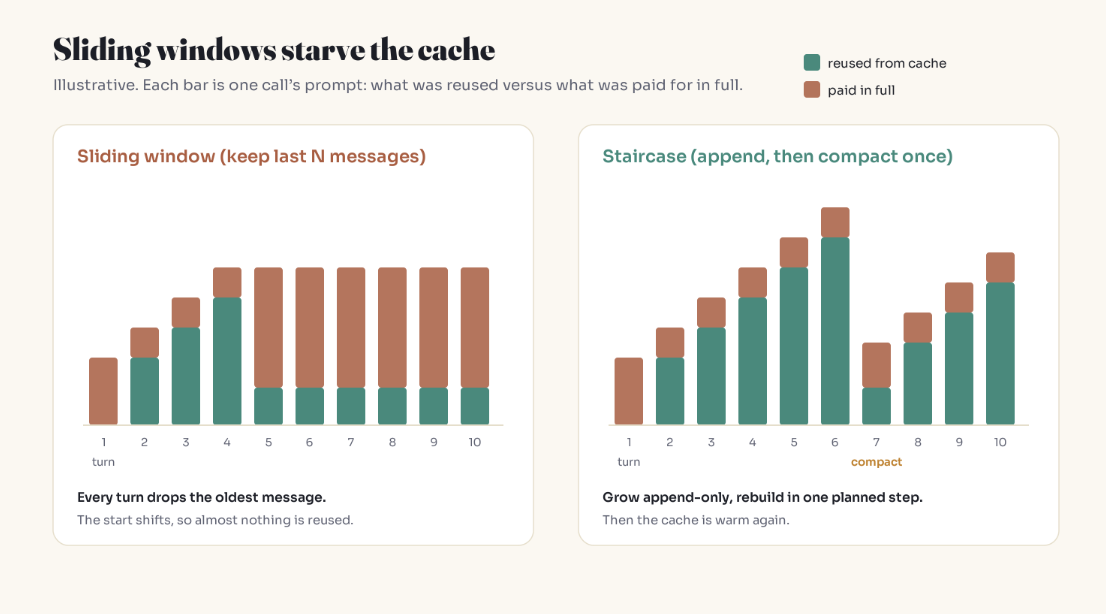
A staircase grows append-only, then compacts once:
COMPACT_AT = 120_000   # tokens; choose from your model's window and your quality tests
KEEP_RECENT = 12       # most recent messages kept verbatim

def maybe_compact(messages, count_tokens, summarize):
    if count_tokens(messages) < COMPACT_AT:
        return messages                      # append-only: touch nothing
    old, recent = messages[:-KEEP_RECENT], messages[-KEEP_RECENT:]
    summary = summarize(old)                 # one deliberate rebuild
    head = {"role": "user", "content": f"Summary of earlier work:\n{summary}"}
    return [head] + recent                   # adjust to your API's role-order rules
You pay one rebuild, then the cache is warm again. Compaction also helps quality, since very long contexts degrade attention (Why AI Forgets What You Said). Batching gets that benefit without paying the cache penalty every turn.
Cache lifetime and human pauses
Anthropic's default cache lives five minutes, refreshed on each use; OpenAI's newest models keep a prefix eligible for at least 30 minutes after last use. Agents that wait on human approval steps can outlast that and restart cold. Anthropic's one-hour TTL trades a 2× write price for surviving those pauses. Measure how often your pauses exceed the default before paying for it.
Key Takeaways
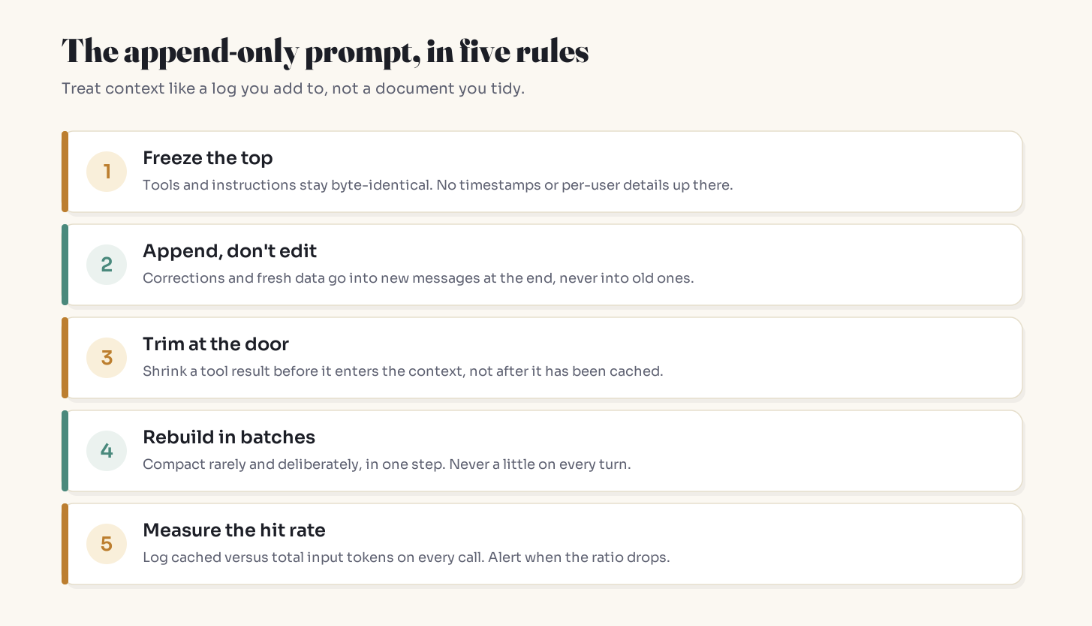
LLM APIs re-read the whole conversation on every call, so an agent's total input grows with the square of its step count.
Prompt caching reuses only an exact prefix. Your first changed byte is the break point.
Freeze the top: tools and instructions byte-identical, deterministically serialized.
Append, don't edit: corrections and fresh data go at the end.
Trim at the door: shrink tool output before it's appended, not after it's cached.
Rebuild in batches: staircase compaction, never a sliding window.
Measure the hit rate on every call and alert when it drops.
FAQ
What is prompt caching in LLM APIs?
Prompt caching lets a provider reuse the computation for the start of a prompt it has recently processed. When a new request begins with the exact same tokens, those tokens are billed at a steep discount and processed faster. Anything after the first difference is processed at full price.
Why is my prompt caching hit rate zero?
Usually something near the top of the prompt changes on every call: a timestamp, user-specific text, retrieved documents, a reordered tool list, or a sliding window that drops the oldest message. Prompts below the provider's minimum cacheable length also never cache.
Does prompt caching change the model's answers?
No. Anthropic's documentation states responses are identical with or without caching. Caching affects cost and time-to-first-token, not output.
How long does a prompt cache last?
On Anthropic's API, five minutes by default, refreshed each time it's used, with an optional one-hour lifetime at a higher write price. On OpenAI's newest models, a cached prefix stays eligible for at least 30 minutes after its last use. Check your model's docs, since this varies.
Is it cheaper to delete old messages from an LLM conversation?
Not always. Deleting tokens from the middle moves the break point earlier, so everything after the deletion is recomputed at full price. Trim content before it enters the context, or compact rarely in one batch.
How do I measure prompt cache hits?
Anthropic returns cache_read_input_tokens, cache_creation_input_tokens and input_tokens; total input is their sum. OpenAI's Responses API reports usage.input_tokens_details.cached_tokens. Divide cached tokens by total input tokens per call and track it per route.
Related reading
How AI Learned to Actually Do Things: tool calling and MCP, the first thing in your prompt
Why AI Forgets What You Said: context windows and lost-in-the-middle
AI Can't Count the R's in Strawberry: tokens, the unit you're billed in
Everyone's Building AI Agents. Almost No One Will Trust Them.: where human approval steps fit
Start Here: the full Simply Explained library
Get one of these in your inbox each week: subscribe to Simply Explained.
The bottom line
On a stateless API, a prompt isn't just text. It's a data structure with a cost model, and that model rewards leaving the past alone. Before the next cleanup step, ask where your first change lands, not how many tokens it removes.
The cheapest token is the one the model has already read. Keep the past still, and it stays cheap.
Adam Jaber is a software engineer who writes Simply Explained: complex topics, made simple. No jargon, no hype.