Cron Job Running Twice (or Not at All)? Fix the Job, Not the Schedule
Duplicate runs, missed runs and late runs share one root cause. Here's the run-ledger pattern, with SQL and the Laravel, Kubernetes and systemd settings that matter.
Answer three questions about the most important scheduled job you run:
- If it doesn't run tonight, who notices?
- If it runs twice, what happens twice?
- If it starts three hours late, which data moves?
If any answer is "not sure," the job is correct only as long as the scheduler fires exactly once, on time, every time. No scheduler promises that.
TL;DR
- Cron and every scheduler built on it promise a start time, not a number of runs. Zero runs and two runs are both normal outcomes.
- A lock (
flock,withoutOverlapping, a Redis key) only answers "is anyone running this right now?" It can't stop a second run after the first finished, and it can't notice a run that never started. - Jobs that compute their window from
NOW()get a gap and an overlap every time a run starts late. - The fix is a run ledger: name each period, claim it with a row only one caller can insert, catch up on every unclaimed period, and alert when a period is missing.
What a scheduler actually guarantees
Cron starts a command at a time. It doesn't know whether the last run happened, finished, or is still going, and it doesn't coordinate with other machines.
Kubernetes documents this directly: a CronJob creates a Job approximately once per scheduled time; occasionally two are created, or none, so jobs should be idempotent. Its concurrencyPolicy defaults to Allow, which permits overlapping runs.
Seven ways the run count goes wrong
| Outcome | Cause | Typical trigger |
|---|---|---|
| Twice | A second scheduler | Scaling to two servers; blue-green deploy overlap |
| Twice | Run outlives its interval | Hourly job taking 70 minutes; overlap allowed by default |
| Twice | Clock repeats an hour | DST ends; some cron builds rerun wildcard jobs in the repeated hour |
| Twice | Manual rerun | Job "failed" at item 4,000; someone reruns from item one |
| Zero | Nothing running at fire time | Reboot, pod reschedule, deploy at 02:00; classic cron has no catch-up |
| Zero | Clock skips an hour | DST starts; behaviour differs by scheduler |
| Zero | Lock outlives the job | Process OOM-killed; lock held until expiry (Laravel default: 24 h) |
On DST specifically: the cronie man page says fixed-time jobs in a skipped interval run immediately after the change, and double runs are avoided in a repeated interval. A Healthchecks.io investigation of Debian's cron found wildcard jobs (minute or hour field starting with *) can fire twice in the repeated hour. Running servers in UTC removes both rows; the other five remain.
Why withoutOverlapping and flock aren't enough
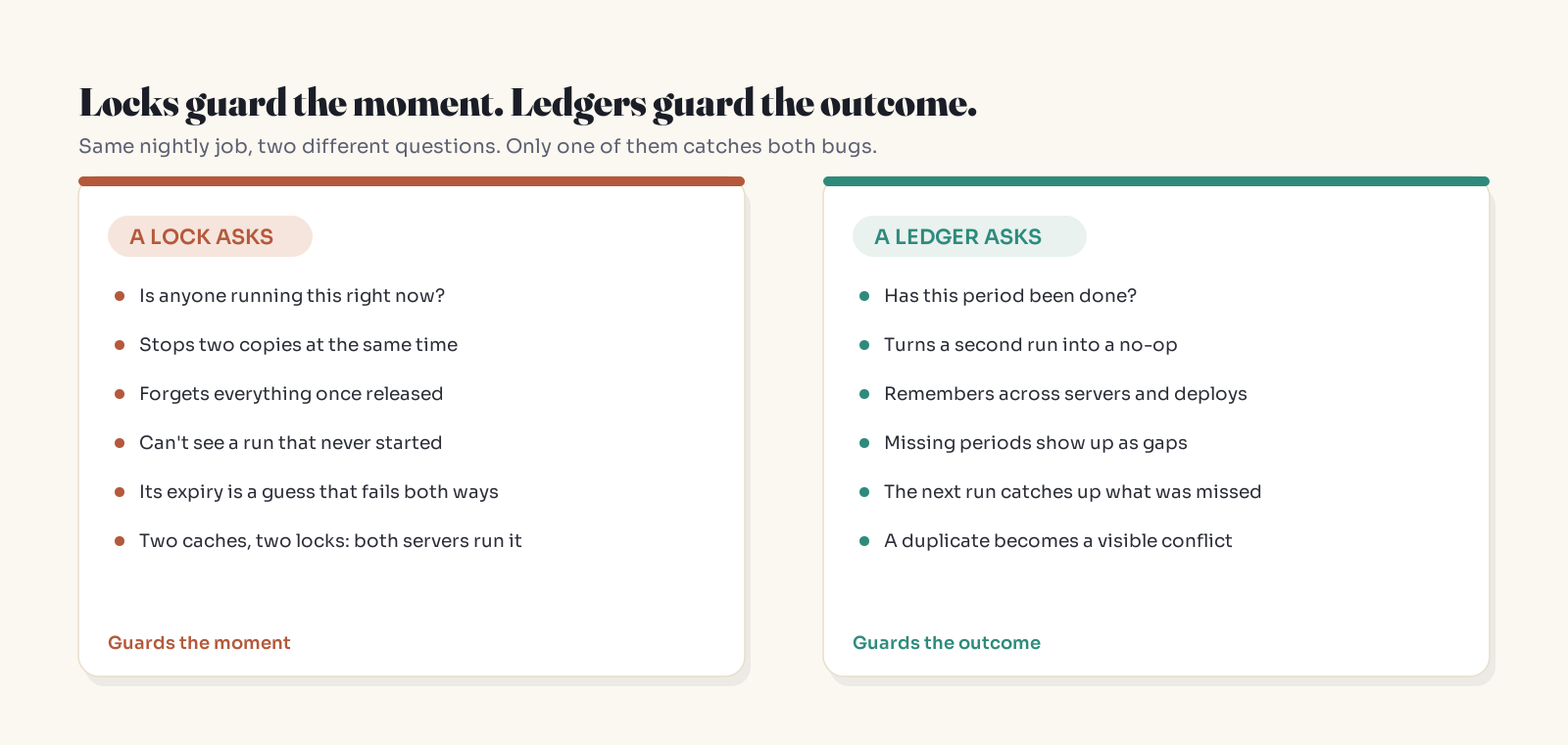
A lock exists while work runs and vanishes when it stops. So:
- A second run five minutes after the first one finished finds no lock and repeats everything.
- A run that never started leaves nothing behind to alert on.
flockand a file-cache lock are local to one machine. Two servers means two locks, and both say "go."
Then there's expiry. Every practical lock has a TTL, and the TTL is a guess about your slowest run:
- Too long: a crashed run keeps the lock and later runs silently skip.
- Too short: a slow run loses the lock mid-flight and a second copy starts beside it. Martin Kleppmann's 2016 essay on distributed locking describes this exact case with a GC pause, and proposes fencing tokens as the fix.
Keep the lock for overlap protection. Don't rely on it for correctness.
The moving-window bug
-- Looks fine. Is wrong whenever a run starts late.
SELECT * FROM orders
WHERE created_at >= NOW() - INTERVAL 1 DAY;
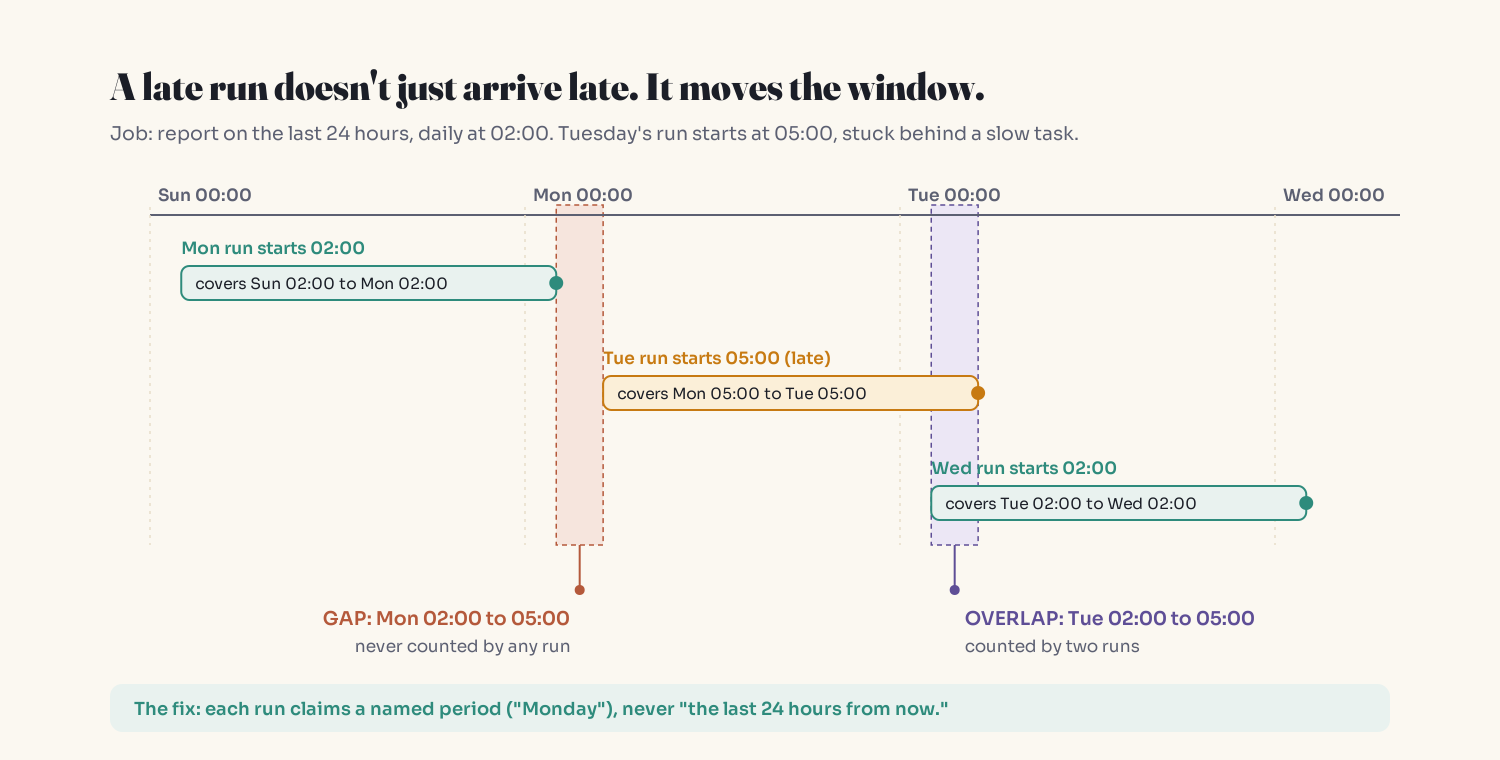
Scheduled daily at 02:00, the Tuesday run starts at 05:00 because it queued behind a slow task (Laravel runs same-minute tasks sequentially unless you use runInBackground()). Result: Monday 02:00 to 05:00 is never counted, and Tuesday 02:00 to 05:00 is counted twice. Every run reports success.
The run ledger, step by step
1. Name the period
Replace "the last 24 hours" with a period key: daily_report:2026-10-27, with explicit boundaries in a timezone you choose on purpose. The start time no longer decides the data.
2. Claim it with a unique key
CREATE TABLE job_runs (
  job_name    VARCHAR(100) NOT NULL,
  period_key  VARCHAR(40)  NOT NULL,
  status      VARCHAR(20)  NOT NULL,          -- running | done
  attempt     INT          NOT NULL DEFAULT 1,
  started_at  TIMESTAMP    NOT NULL,
  finished_at TIMESTAMP    NULL,
  PRIMARY KEY (job_name, period_key)
);

-- Postgres
INSERT INTO job_runs (job_name, period_key, status, started_at)
VALUES ('daily_report', '2026-10-27', 'running', NOW())
ON CONFLICT DO NOTHING;
-- MySQL: plain INSERT and catch the duplicate-key error.
-- Proceed only if exactly one row was inserted.
The database referees the race. Two schedulers, a rerun or a repeated DST hour all become one row plus no-ops.
3. Reclaim stuck runs with a fence
A row stuck in running well past your longest run is unknown, not done. Reclaim it atomically and bump the attempt:
-- Postgres
UPDATE job_runs
SET attempt = attempt + 1, started_at = NOW()
WHERE job_name = 'daily_report'
  AND period_key = '2026-10-27'
  AND status = 'running'
  AND started_at < NOW() - INTERVAL '3 hours';
-- 1 row updated = you own attempt N+1

-- Finish only if you are still the current attempt
UPDATE job_runs
SET status = 'done', finished_at = NOW()
WHERE job_name = :job AND period_key = :period AND attempt = :my_attempt;
The attempt check works like a fencing token: an older attempt that wakes up late can't mark the period done.
4. Catch up on every missing period
last_done = latest_done_period("daily_report")
for period in periods_after(last_done, up_to=yesterday()):
    attempt = claim(period)          # None if someone else owns it
    if attempt is None:
        continue
    build_report(period)             # per-item idempotent writes
    mark_done(period, attempt)
A missed night becomes a row the next run creates.
5. Watermarks for continuous work
No natural period (syncing changed rows, draining a queue table)? Store the last (updated_at, id) processed and take everything after it:
SELECT * FROM orders
WHERE (updated_at, id) > (:last_updated_at, :last_id)
ORDER BY updated_at, id
LIMIT 500;
Advance the watermark in the same transaction as the work. One caveat: a long transaction can commit a row with an updated_at older than your watermark. Leave a small safety lag (only process rows older than a few minutes) and let per-item idempotency absorb the overlap.
6. Make each item safe to repeat
The ledger protects the period, not a half-finished one. Give side effects their own keys: an email log keyed by (customer_id, period_key), payments keyed by an idempotency key.
Platform settings that help (but don't make a job correct)
Laravel
use Illuminate\Support\Facades\Schedule;

Schedule::command('reports:daily')
    ->dailyAt('02:00')
    ->timezone('UTC')
    ->withoutOverlapping(180)   // minutes; default lock expiry is 24 hours
    ->onOneServer();            // requires a cache all servers share
Kubernetes
spec:
  schedule: "0 2 * * *"
  timeZone: "Etc/UTC"
  concurrencyPolicy: Forbid      # default is Allow
  startingDeadlineSeconds: 600   # bounds lateness; helps avoid the 100-missed-schedules stop
systemd
[Timer]
OnCalendar=*-*-* 02:00:00
Persistent=true   # run a missed job after downtime; not on by default
Monitor for silence
A double run makes noise. A missing run makes none. Add:
- a heartbeat ("dead man's switch") that alerts when the success ping doesn't arrive;
- a ledger query that alerts when an expected period has no
donerow by its deadline; - a counter for claim conflicts, so a second scheduler shows up as a spike.
The Zero-Once-Twice checklist
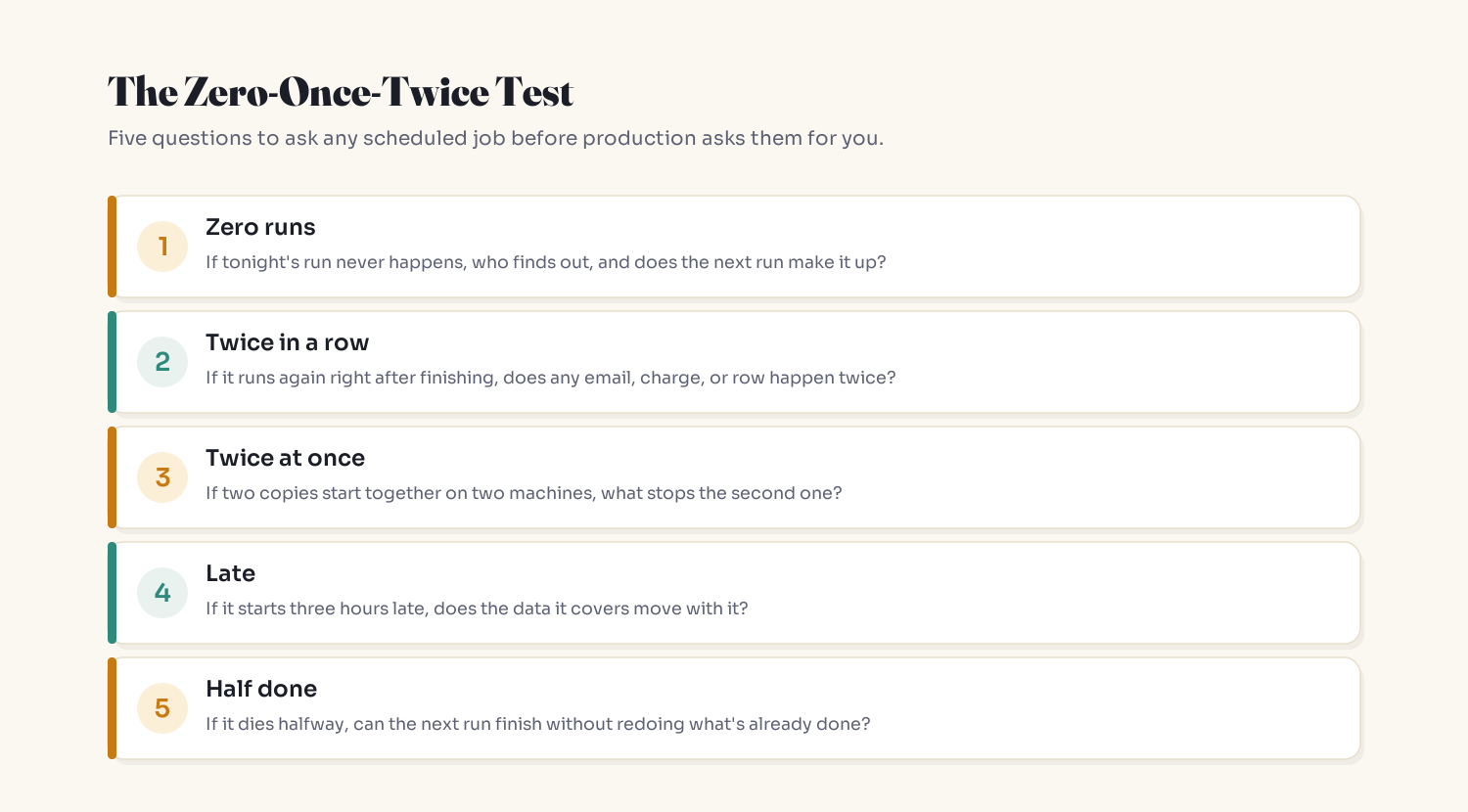
- Zero runs: who finds out, and does the next run make it up?
- Twice in a row: does any email, charge or row happen twice?
- Twice at once: what stops the second copy on another machine?
- Late: does the covered data move with the start time?
- Half done: can the next run finish without redoing finished work?
Key Takeaways
- Schedulers promise a start time. Treat zero and two runs as expected inputs.
- Locks prevent concurrent runs only, and their TTL fails in both directions.
- Never derive a job's scope from
NOW(). Name the period. - A unique
(job_name, period_key)row turns duplicates into no-ops and gaps into visible missing rows. - Alert on absence, not just on errors.
FAQ
Why is my cron job running twice?
Usually one of four things: two machines each running the scheduler, a run that lasts longer than its interval with overlap allowed, a repeated hour when daylight saving ends, or a manual rerun. Check how many schedulers are live first; scaling out is the most common surprise.
Does flock or withoutOverlapping prevent duplicate cron jobs?
Only concurrent duplicates on machines that share the lock. flock is local to one machine, and Laravel's lock lives in the default cache. Neither stops a second run that starts after the first finished.
What happens to cron jobs during daylight saving time?
It depends on the implementation. cronie runs fixed-time jobs from a skipped hour right after the change and avoids double runs in a repeated hour; Debian's cron can run wildcard jobs twice in the repeated hour. Running servers in UTC avoids the problem.
Will a missed cron job run later?
Not with classic cron. systemd timers can catch up with Persistent=true, and Kubernetes can start a late Job within startingDeadlineSeconds. A run ledger with catch-up makes the job itself recover regardless of scheduler.
Does a Kubernetes CronJob guarantee exactly-once execution?
No. The documentation says it creates a Job approximately once per schedule and that two or none are possible, so jobs should be idempotent. concurrencyPolicy: Forbid stops overlap but not every duplicate.
How do I make a scheduled job idempotent?
Give each run a named period, claim it with a unique database row before doing work, give each side effect its own idempotency key, and mark the period done only if your attempt still owns it.
Related reading
- Why Your API Charges People Twice (And the One Idea That Fixes It): per-item idempotency keys
- Offset vs Cursor Pagination: Why Your Pages Skip and Repeat Rows: why watermarks beat offsets
- Your Database Transaction Didn't Save You From This Bug: letting the database referee races
- There's No Safe Order for Two Writes: when one step writes to two systems
- Your Worker Read the Past. Then It Saved It.: another background job that succeeds while being wrong
The bottom line
The scheduler keeps its promise: it starts your command around 02:00. Everything else, including whether the work happened exactly once, is the job's responsibility. Give the job a memory of what's done, and twice becomes harmless while zero becomes loud.
Cron's job is to remember the time. Your job's job is to remember the work.
New here? Start with Start Here: A Plain-English Map to Understanding AI. Get one of these in your inbox each week: subscribe to the Simply Explained newsletter.
Adam Jaber is a software engineer who writes Simply Explained: complex topics, made simple. No jargon, no hype.
About the author
- I'm a software engineer who spends most days building systems that solve real problems. When I'm not shipping code, I'm either untangling a tricky problem or writing about what I learned doing it. Currently exploring AI on the side.
Comments
Join the discussionNo comments yet. Be the first to comment.
The Systems Behind the Software
Plain-English deep dives into the backend and system-design ideas that quietly run everything — caching, idempotency, databases, distributed systems, and the subtle bugs the obvious approach never prevents. No jargon, no hype. Each piece starts with a real production problem, builds the intuition, then shows how to actually get it right.