How to Understand a New Codebase: Trace One Request, Not Every File
Why Go to Definition dead-ends in modern frameworks, and the five-step Request Trace that maps the hidden wiring
You click PaymentGateway, hit Go to Definition, and land on an interface. Three classes implement it. Which one runs in production? Nothing on screen tells you.
That small moment explains most of why new codebases feel impossible. The answer you need isn't in a file you can open. It lives in a service provider, a config value, or an environment variable, and your editor can't follow the jump.
This post is about getting productive in an unfamiliar codebase by doing the opposite of reading it: make the running system show you the path, then write down where you were wrong.
TL;DR
- Modern frameworks move the wiring (routing, middleware, DI, events, decorators) out of the code you read and into conventions and config.
- So static reading and Go to Definition fail at exactly the steps that matter.
- Trace one real request instead: predict its path, run it, record every mismatch.
- Trace forward to learn a feature. Trace backward from the data before you change a business rule.
Why reading a codebase doesn't work like reading a book
Comprehension is most of a developer's working time. A large field study by Xia and colleagues (IEEE TSE, 2018) followed 78 professional developers over 3,148 working hours and measured about 58% of their time going to program comprehension, with seniors spending a smaller share than juniors.
The way people usually attack it is search. In a small lab study, Ko and colleagues (IEEE TSE, 2006) watched ten developers work on an unfamiliar Java program. Most began tasks with a text search. On average, 88% of their searches led to nothing they used later, and more than a third of their time went to code that turned out to be irrelevant. The authors traced it to developers searching on limited and misleading cues.
Misleading is the key word. The code on the page points one way, and execution goes another, because the framework is doing the connecting.
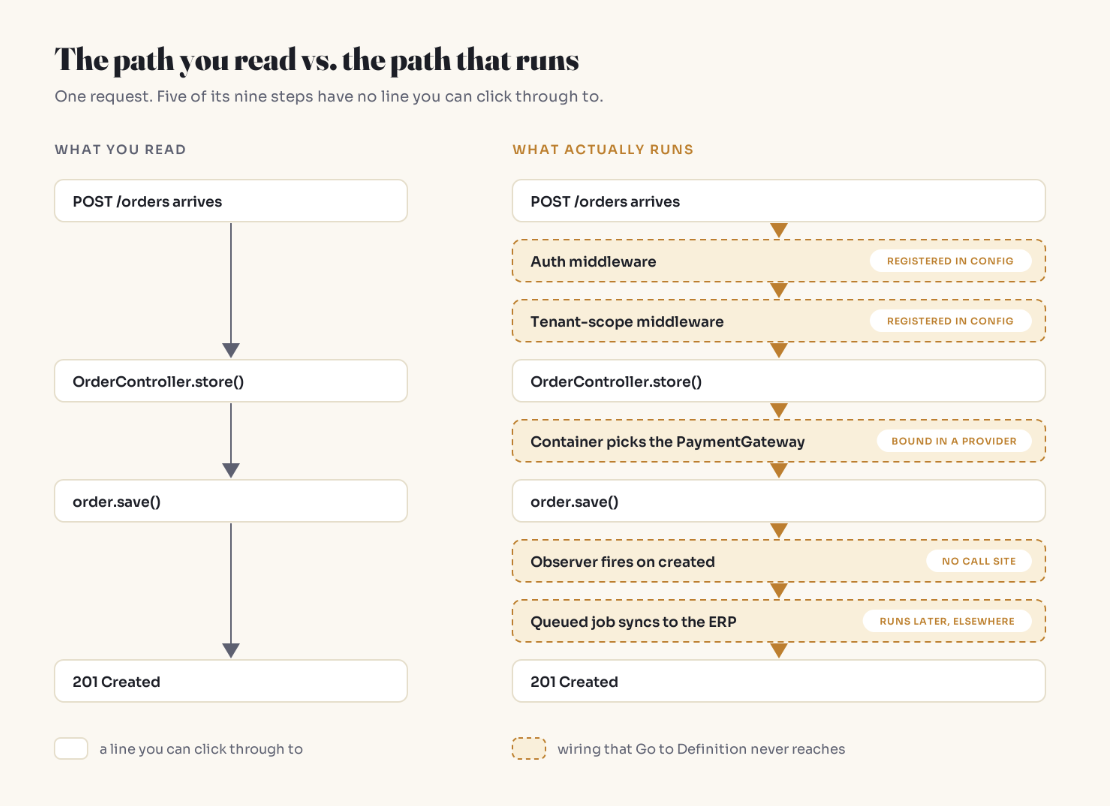
Where Go to Definition goes dark
Convention routing. No line calls the controller action:
# config/routes.rb
resources :orders   # POST /orders is handled by OrdersController#create
Middleware registered in config. It runs before your handler and never appears in it:
# settings.py (Django)
MIDDLEWARE = [
    "django.middleware.security.SecurityMiddleware",
    "django.contrib.auth.middleware.AuthenticationMiddleware",
    "myapp.middleware.TenantScopeMiddleware",   # filters every request by tenant
]
Dependency injection. The type you click is an interface; the class that runs is chosen at boot, and may differ per environment:
// app/Providers/AppServiceProvider.php (Laravel)
$this->app->bind(PaymentGateway::class, function () {
    return app()->environment('testing') ? new FakeGateway : new StripeGateway(config('services.stripe.key'));
});
Events, signals, observers. Side effects attached to save() with no call site. Django signals, Rails callbacks, Laravel observers.
Decorators and annotations. @Transactional, @Cacheable, or a Python decorator changes what calling the method means. The body is only part of the behavior.
Strings and flags. Queue job names, event names, handlers resolved by name, feature flags. If you don't guess the string, search won't find it.
None of this is bad design. It's a trade: less boilerplate, less visibility. Every codebase you join has two layers, the code and the wiring that decides which code runs.
The code tells you what can happen. Only the running system tells you what does.
The Request Trace
An observational study by Roehm and colleagues (ICSE 2012) of 28 professional developers at seven companies found they tried to avoid comprehension: they understood what the task needed and stopped, often by putting themselves in the end user's seat. They learned paths, not codebases. The Request Trace makes that deliberate.
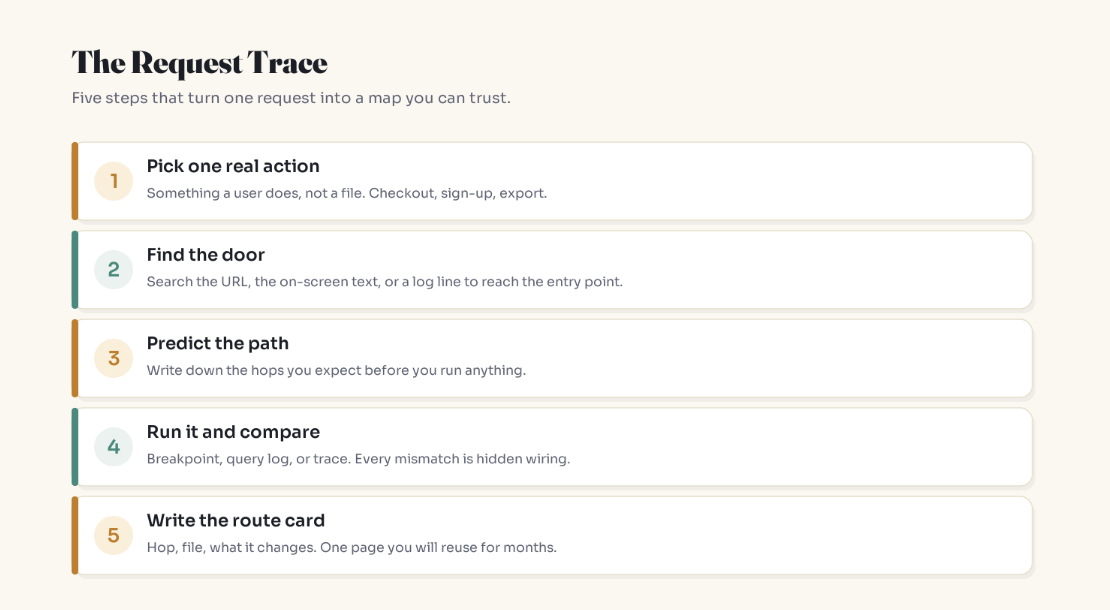
1. Pick one real action
Checkout, sign-up, export. An action, not a file.
2. Find the door
Search what the user can see: the URL path, button text, a validation message.
git grep -n "/orders"                      # route definitions
git grep -n "Order placed successfully"    # on-screen text
git grep -n "SyncToErp"                    # for async paths: job or event name
3. Predict before you run
Write the hops you expect. Specific enough to be wrong.
4. Run it with the lights on
Breakpoint at the door, then step. Turn on query logging so every database call is visible:
# Django: queries are recorded when DEBUG = True
from django.db import connection
for q in connection.queries:
    print(q["sql"])
// Laravel
DB::enableQueryLog();
// ...exercise the endpoint, e.g. from a feature test...
dump(DB::getQueryLog());
# Rails prints SQL to the development log
tail -f log/development.log
If the team has distributed tracing, pull one trace for this action. It's the path already drawn.
5. Write the route card
Every mismatch with your prediction gets a [hidden] tag. That column is the knowledge reading can't give you.
ROUTE: POST /orders   (web checkout)

hop  what                    where it's wired          what it does
1    AuthMiddleware          HTTP kernel config        rejects guests
2    TenantScope             HTTP kernel config        filters queries by tenant   [hidden]
3    OrderController@store   routes/web.php            validates, calls OrderService
4    PaymentGateway          AppServiceProvider        real gateway in prod, fake in tests   [hidden]
5    Order::create           app/Models/Order          INSERT orders, INSERT order_items
6    OrderObserver@created   registered at boot        queues SyncToErp   [hidden]
7    SyncToErp               queue worker              runs later, on another process   [hidden]
Forward trace vs backward trace
A forward trace teaches you one path end to end. It won't find the other paths into the same data.
Say your ticket is "orders over $500 need manager approval." You add the check to the checkout controller. It works. Then an order arrives through the mobile API, or a nightly CSV import, and skips it entirely. Your code was right. It guarded one door.
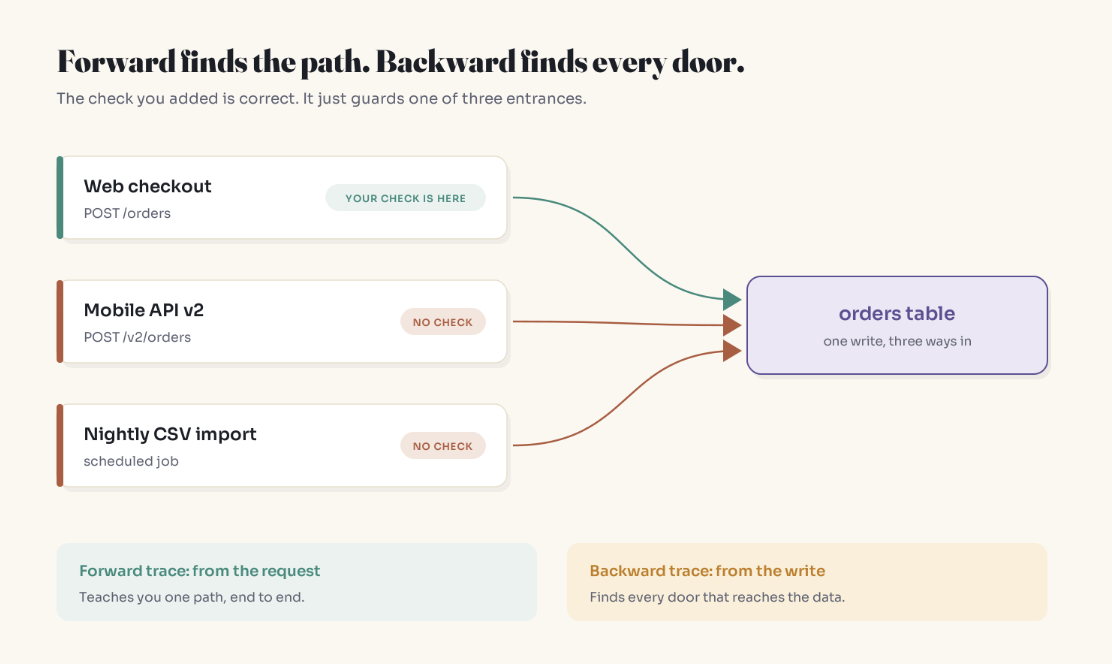
A backward trace starts at the write. First, find every writer, including bulk paths that skip model hooks (Django's bulk_create sends no save signals; Rails' insert_all skips callbacks and validations):
git grep -niE "insert into orders|update orders"     # raw SQL
git grep -nE "bulk_create|insert_all|::insert\("     # bulk paths that bypass hooks
Then let the system report its own doors. Add a temporary hook that logs a stack trace, run the test suite and scheduled jobs locally, and collect the distinct stacks:
# Django: temporary, remove after mapping
import logging, traceback
from django.db.models.signals import post_save
from django.dispatch import receiver

@receiver(post_save, sender=Order)
def who_created_this(sender, instance, created, **kwargs):
    if created:
        logging.warning("Order created via:\n%s", "".join(traceback.format_stack(limit=12)))
// Laravel: temporary, in AppServiceProvider::boot()
Order::created(function ($order) {
    $frames = collect(debug_backtrace(DEBUG_BACKTRACE_IGNORE_ARGS, 15))
        ->map(fn ($f) => ($f['file'] ?? '?') . ':' . ($f['line'] ?? '?'));
    logger()->warning('Order created via', $frames->all());
});
Rule of thumb: trace forward to learn a feature; trace backward before you change a rule. Limits, permissions, and prices belong to the data, and data usually has more than one way in.
Your laptop isn't production
Same code, different wiring. Environment variables swap implementations, flags enable branches for some users, and some scheduled jobs exist only on servers. Config can change behavior without a deploy.
Don't debug production. Verify against it: read the production config and flag state for your path, then compare one real request's logs or trace with your route card. When they disagree, the card is wrong.
A first-week plan: three traces
- Read path. A page or endpoint that fetches data. Routing, auth, data layer, serialization.
- Write path. Something that changes state. Validation, transactions, side effects on save.
- Async path. A job, a scheduled task, an event consumer. The half of the system that runs when nobody clicks.
Most web requests are variations of those shapes, so three cards cover a lot. Keep your predictions alongside them: the shrinking gap between predicted and actual is what experience really is.
On AI tools: a repo summary is useful orientation on day one, but it's built from the same static reading, and summaries tend to drop the conditional details that matter most. Use it to help you predict a path, then run the path.
And when a trace hits a line that looks wrong, read its history before you touch it. git blame often points at the wrong commit, and the real reason is usually further back.
Key Takeaways
- Frameworks relocate wiring into conventions and config, so reading files shows you only part of the path.
- Go to Definition dead-ends at routing conventions, middleware, DI bindings, observers, decorators, and string-based dispatch.
- The Request Trace: pick an action, find the door, predict, run with query logs or traces, write a route card.
- Every mismatch between prediction and reality is hidden wiring. Mark it
[hidden]. - Trace backward from the data before changing a business rule; bulk writes often bypass model hooks.
- Verify your card against production logs and config, never by debugging production.
FAQ
What is the fastest way to understand a large codebase?
Trace one real user action end to end instead of reading files. Find the entry point by searching for the URL or on-screen text, predict the path, run it with a debugger and query logging, and write down every step you didn't predict. Repeat for a read path, a write path, and an async path.
Why does Go to Definition stop working in frameworks like Rails, Django, Laravel, or Spring?
Because those frameworks connect code through conventions, configuration, and runtime registration rather than direct calls. Routes, middleware, dependency-injection bindings, event listeners, and decorators are wired outside the function you're reading, so there's no call site for the editor to follow.
How long does it take to understand a new codebase?
There's no honest universal number; it depends on size, documentation, and how much hidden wiring the stack uses. Research does show comprehension dominates working time (about 58% in Xia et al.'s 2018 field study) and that experienced developers spend a smaller share on it. The practical goal is understanding the paths your work touches, not the whole system.
Should I read the documentation or architecture diagram first?
Read them, but treat them as claims to verify. Diagrams describe the system someone intended; a traced request shows the one that runs. Where they disagree, trust the trace and tell the team the doc is stale.
Can AI tools help me understand an unfamiliar codebase?
Yes, for orientation and for generating a predicted path to check. But a summary produced from reading files shares reading's blind spot and tends to smooth over exceptions and conditional behavior. Treat AI explanations as predictions and confirm them by running the code.
How do I find every place that writes to a database table?
Search for model writes, raw SQL, and bulk operations (which often bypass model hooks), then add a temporary create hook that logs a stack trace and run the test suite and scheduled jobs. Each distinct stack trace is a separate entry point into that data.
Related reading
- git blame Is Pointing at the Wrong Commit: what to do when your trace lands on a line that makes no sense
- Nobody Deployed Anything. Production Broke Anyway.: why config and flags are wiring too
- The Exception Pass: Catching What AI Summaries Delete: why a repo summary misses the odd paths
- Experience Isn't Years. It's Surprises: why the prediction step is the part that makes you better
- New here? Start Here: A Plain-English Map to Understanding AI
The bottom line
Nobody understands a whole codebase. Good engineers understand the paths they've walked and know where the hidden wiring tends to live. Three traced requests, with honest predictions written down first, will teach you more in a week than a month of scrolling through folders.
Stop asking what the code says. Start asking what the code did.
Get one of these in your inbox each week: subscribe to Simply Explained.
Adam Jaber is a software engineer who writes Simply Explained: complex topics, made simple. No jargon, no hype.
About the author
- I'm a software engineer who spends most days building systems that solve real problems. When I'm not shipping code, I'm either untangling a tricky problem or writing about what I learned doing it. Currently exploring AI on the side.
Comments
Join the discussionNo comments yet. Be the first to comment.
The Systems Behind the Software
Plain-English deep dives into the backend and system-design ideas that quietly run everything — caching, idempotency, databases, distributed systems, and the subtle bugs the obvious approach never prevents. No jargon, no hype. Each piece starts with a real production problem, builds the intuition, then shows how to actually get it right.