git blame Is Pointing at the Wrong Commit
How to find out why legacy code exists before you delete it
Run git blame on any line older than your last formatter pass and you'll get something like this:
9f31c0e2 (Former Teammate 2024-03-11) time.sleep(0.25)
Open the commit and it says chore: run black across the repo. No reason. No ticket. The author left last year.
At that point most investigations stop, and the cleanup PR gets written. This post is about what to do instead: where the real reason for weird code hides, the exact Git commands that dig it out, and what to do when the history is genuinely empty.
TL;DR:
git blameanswers "who touched this last?" You need "who put this here, and why?" The answer usually sits under the last touch, beside the line in its original commit, or outside Git in the PR and ticket. When you find nothing, instrument the code path instead of deleting it.
The example: a sleep nobody can explain
Here's the scenario we'll use throughout. It's invented, but its shape will be familiar to anyone who has maintained an older service.
charge = provider.create_charge(order)
time.sleep(0.25)
provider.capture(charge.id)
A quarter-second pause on every checkout, no comment, no obvious test. A new engineer deletes it after blame points at a formatter commit. At month-end, a burst of subscription renewals hits the payment provider and capture requests start getting rejected for exceeding its rate limit.
The sleep was scar tissue. It existed because the system got hurt there once. Clean code describes how a system should work; weird code records where it broke.
Why git blame points at the wrong commit
git blame shows the commit that last modified each line. Over a few years, that's rarely the commit that gave the line its purpose. Formatters reflow lines, modules get renamed, files move during restructures, and framework upgrades touch every call site. Each legitimate mechanical commit stamps its name on top.
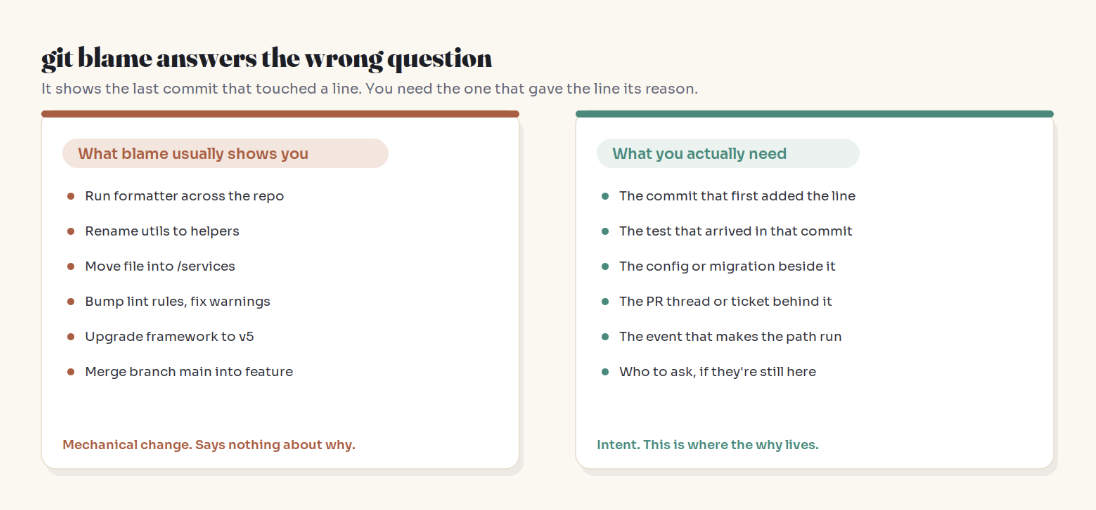
So blame tends to show you the last janitor, not the original builder.
The three layers where the reason hides
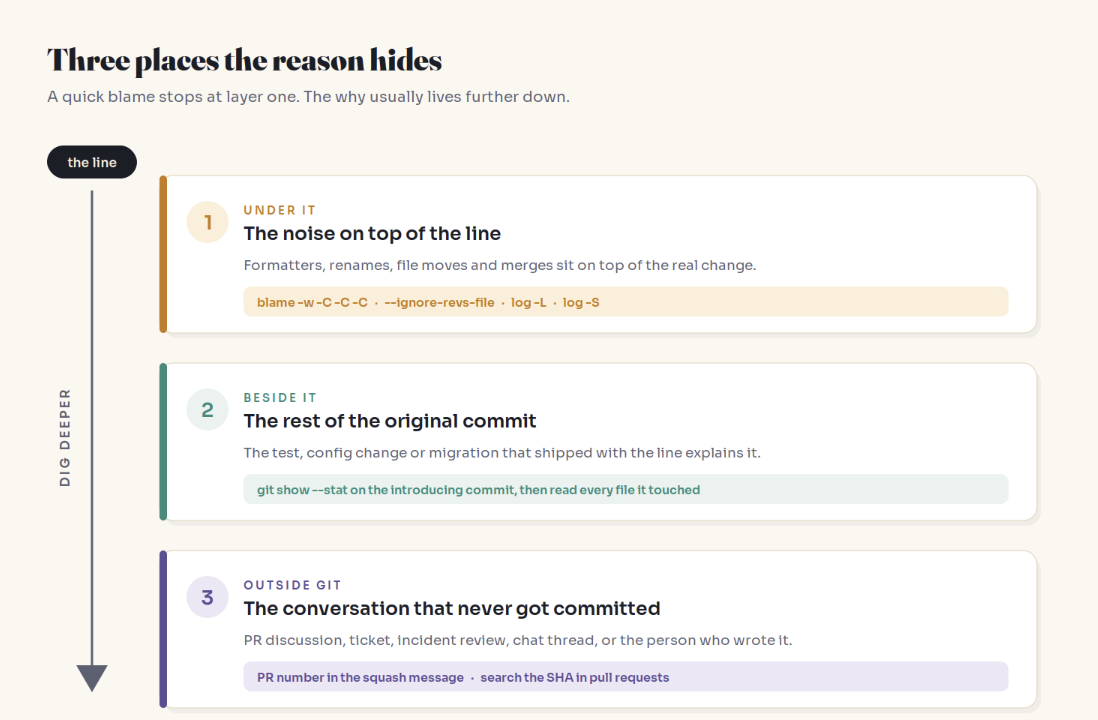
Layer 1: dig under the mechanical commits
# Ignore whitespace; detect lines moved or copied from other files
git blame -w -C -C -C checkout.py

# Skip known bulk commits listed in a file
git blame --ignore-revs-file .git-blame-ignore-revs checkout.py

# Full history of one function, diff by diff
git log -L :capture_payment:checkout.py

# Same, by line range, if function detection struggles
git log -L 40,60:checkout.py

# Commits that added or removed this text, oldest first
git log -S "sleep(0.25)" --reverse --oneline
| Command | Question it answers |
|---|---|
blame -w -C -C -C |
Who wrote this, ignoring whitespace and code moves? |
--ignore-revs-file |
Who wrote this, skipping known noise commits? |
log -L |
How did this function or range evolve? |
log -S (pickaxe) |
When did this exact text first appear? |
Two practical notes:
If
log -L :funcname:picks the wrong boundaries, declare the language in.gitattributes(for example*.py diff=python).If a formatter changed the text itself (
sleep(.25)tosleep(0.25)), the pickaxe will stop at the formatter. Search for a fragment that survived, such assleep(, limited to the file.
Layer 2: read the whole introducing commit
git show --stat a1b2c3d
The reason often ships with the line. A commit that adds the sleep plus a test named test_capture_survives_provider_burst_limit has explained itself. A commit that adds an oddly specific ORDER BY next to a change in how rows are locked is about lock ordering, a classic deadlock fix (see Two Transactions, Frozen Forever).
A test that shipped with weird code is the reason, written in a form that can fail.
Squash merges collapse a PR into one commit, but GitHub's default squash message ends with the PR number, like (#1482). That's your bridge to layer 3.
Layer 3: follow it outside Git
# Find the merged PR that contains a commit
gh pr list --state merged --search "a1b2c3d"
Read the review comments, not just the description. That's where "why the sleep?" gets answered. If the author is still on the team, a short message asking what the line was protecting against is the cheapest investigation available.
When the history is silent: instrument, don't delete
Sometimes all three layers come up empty. "I couldn't find a reason" is a fact about your archive, not about the code. Make the code testify instead:
time.sleep(0.25)
logger.info(
    "capture.pause_path_hit",
    extra={"order_id": order.id, "batch_id": order.batch_id},
)
Then wait for at least one full cycle of whatever might trigger the path. Defensive code often guards events that don't happen on a normal day:
Month-end and quarter-end batches
Daylight-saving transitions and February 29th
Retry paths that only fire when a dependency is slow (a timid-looking retry limit can be what stops a blip becoming a pile-up; see The Outage Was Over in 40 Seconds)
One large customer with unusually shaped data
Two quiet weeks prove nothing about code that runs once a year. When you do remove it, do it behind a flag so rollback takes seconds.
Hyrum's Law adds a second reason for patience: with enough users, every observable behaviour ends up depended on by someone, intended or not. Instrumentation is how you meet those users before they file the ticket.
The four-question checklist
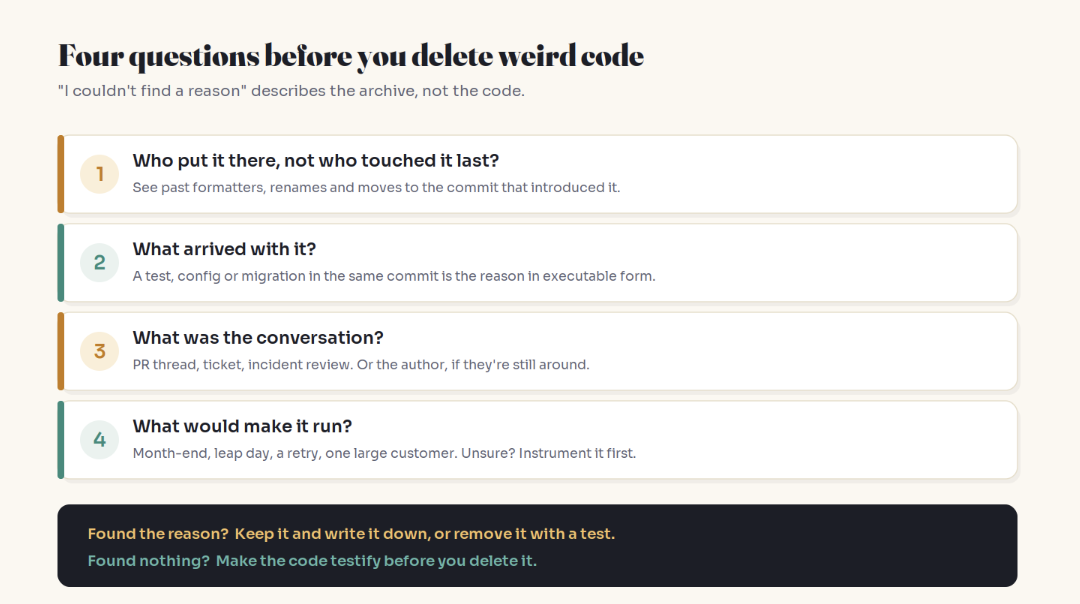
Who put it there, not who touched it last?
What arrived with it?
What was the conversation?
What would make it run?
Found the reason: keep it and add the missing comment, or remove it together with a test proving the old failure can't return. Found nothing: instrument first.
Leave a trail for the next person
Write commit messages for whoever will run git blame on your work:
Add 250ms pause between charge and capture

Provider rejects capture bursts above its rate limit
during month-end renewals (INC-2231). The pause keeps
us under the limit.

Safe to remove if: capture moves to the batch API,
or the provider raises the burst limit.
The "safe to remove if" line is the one almost nobody writes. It turns a fence into a fence with a sign on it.
And stop your own bulk commits from polluting blame:
# .git-blame-ignore-revs (one full commit hash per line)
# chore: run black across the repo
9f31c0e2b7d4a8e61c5f0a3b2d9e7c4f1a6b8d20

git config blame.ignoreRevsFile .git-blame-ignore-revs
GitHub's blame view reads the same file from the repository root.
This is also a career skill. On a new team, the engineer who says "this looks pointless, but it was added after the provider throttled us, so here's a safer way to remove it" earns trust faster than the one who ships the tidy deletion. AI assistants read the code in front of them, not the history behind it, so that judgment stays with you (AI Won't Take Your Coding Job. It Will Change It.). And a good commit message is the receipt that keeps preventive work visible (Your Best Work Erases Its Own Evidence).
Key Takeaways
git blameshows the last commit to touch a line, which is often a formatter, rename or move.The reason hides in three layers: under the last touch, beside it in the original commit, and outside Git.
blame -w -C -C -C,--ignore-revs-file,log -Landlog -S --reverseget you past the noise.Read the whole introducing commit; a test shipped alongside is the reason in executable form.
No reason found is not the same as no reason. Instrument, wait a full cycle, remove behind a flag.
Write "safe to remove if" in your commit messages.
FAQ
Why does git blame show the wrong author?
Because it reports the last commit that modified each line. Reformatting, renames, file moves and mass upgrades all count as modifications, so the original author gets buried. Use -w -C -C -C or an ignore-revs file to see past them.
How do I find the commit that first introduced a line of code?
Use the pickaxe: git log -S "exact text" --reverse --oneline. The first result is where the text appeared. If the text itself was reformatted, search for a fragment that survived.
What is .git-blame-ignore-revs?
A file listing commit hashes that git blame should skip, typically formatter or rename commits. Enable it with git config blame.ignoreRevsFile .git-blame-ignore-revs. GitHub's blame view also respects it.
How do I see the full history of a single function in Git?
Run git log -L :function_name:path/to/file. It shows every diff that touched the function, in order. If boundaries look wrong, pass a line range or set a diff driver in .gitattributes.
Is it safe to delete code I don't understand in a legacy codebase?
Not until you've checked its introducing commit, the files that changed with it, and the PR or ticket behind it. If you still find nothing, log when the path runs and wait a full business cycle before removing it behind a flag.
What is Chesterton's fence in programming?
The principle that you shouldn't remove something until you understand why it was put there. In code, that means investigating a line's history and context before deleting it, rather than assuming it's unnecessary because the reason isn't obvious.
Related reading
The bottom line
The cleanest-looking deletion in a pull request can be the most dangerous one, because its risk lives in history nobody read. Dig through the three layers, instrument when they're empty, and leave a better trail than you found.
Clean code tells you how the system should work. Weird code tells you where it got hurt.
Adam Jaber is a software engineer who writes Simply Explained: complex topics, made simple. No jargon, no hype.