Offset vs Cursor Pagination: Why Your Pages Skip and Repeat Rows
A field guide to six pagination bugs, the one cause behind them, and keyset queries that hold up in production.
If you've hit any of these, pagination is the likely suspect:
A batch job finishes, reports success, and leaves rows unprocessed.
An infinite-scroll feed shows the same post twice, or quietly misses some.
An export comes out a few rows short, even though nobody wrote to the table during it.
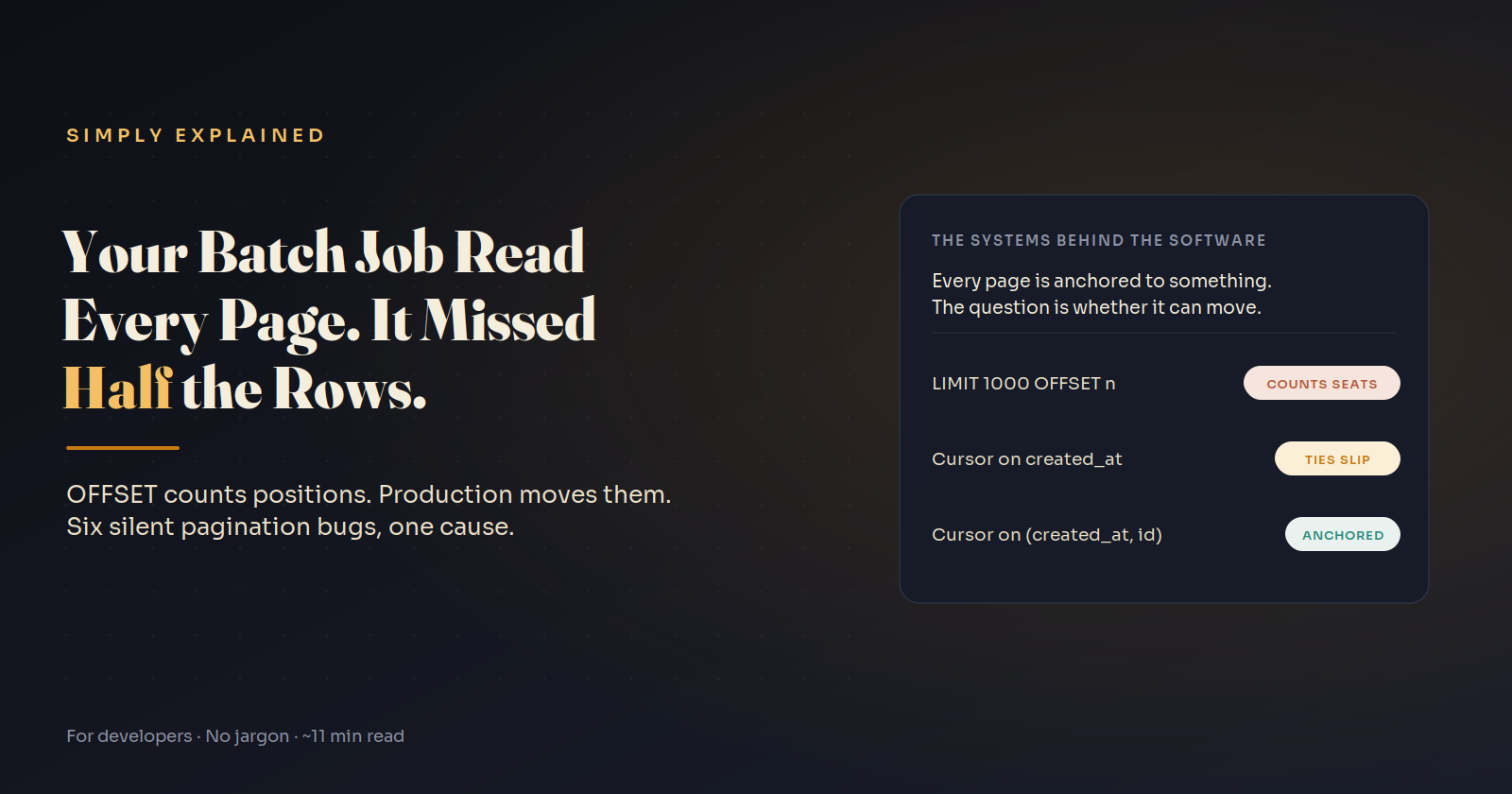
None of them throw an error. All of them come from one idea: every "next page" is anchored to something, and if that anchor can move, rows get skipped or repeated. OFFSET anchors to a position. Cursors anchor to a row's values. Both can be anchored to something that moves.
This guide gives you the symptom table, a 30-second reproduction, and keyset pagination recipes that pass a four-question test.
The symptom table
| Symptom | What moved | Fix |
|---|---|---|
| Batch job leaves every other batch unprocessed | The OFFSET position, shifted by the job's own updates | Seek by primary key, freeze the upper bound |
| Feed repeats or misses items while scrolling | The OFFSET position, shifted by inserts and deletes | Keyset cursor |
| Pages disagree with no writes at all | Nothing; a non-unique ORDER BY lets ties reorder |
Add a unique tiebreaker |
| Timestamp cursor drops rows, or loops forever | Ties at the cursor boundary | Cursor on (created_at, id) |
Cursor on updated_at or score drifts |
The sort key itself, mid-pagination | Sort by a value that doesn't change |
| Rows with NULL in the sort column never appear | Nothing reachable; NULL comparisons are never true | NOT NULL, or handle NULLs explicitly |
The first three are OFFSET bugs. The last three are what's waiting for you after you switch to cursors.
Reproduce the batch-job bug in 30 seconds
Paste this into any PostgreSQL database. It creates 10,000 pending invoices and processes them the way a straightforward batch job would: 1,000 at a time, marking each batch as sent, moving the offset forward until a batch comes back empty.
CREATE TABLE invoices (id int PRIMARY KEY, status text NOT NULL);
INSERT INTO invoices SELECT g, 'pending' FROM generate_series(1, 10000) g;

DO $$
DECLARE
  skip_n int := 0;
  n      int;
BEGIN
  LOOP
    UPDATE invoices SET status = 'sent'
    WHERE id IN (
      SELECT id FROM invoices
      WHERE status = 'pending'
      ORDER BY id
      LIMIT 1000 OFFSET skip_n
    );
    GET DIAGNOSTICS n = ROW_COUNT;
    EXIT WHEN n = 0;
    skip_n := skip_n + 1000;
  END LOOP;
END $$;

SELECT count(*) AS still_pending FROM invoices WHERE status = 'pending';
-- still_pending: 5000
Half the invoices are still pending: ids 1,001 to 2,000, 3,001 to 4,000, and so on. Exactly every other block.
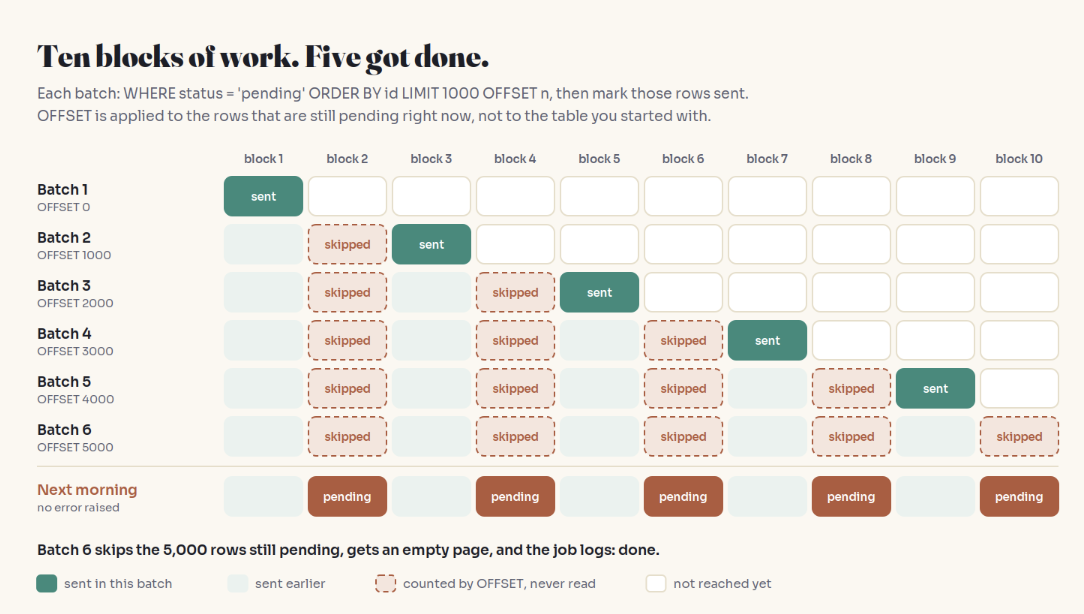
The reason is one sentence: OFFSET 1000 doesn't mean "start at row 1,001 of the table." It means "re-run the query now and discard the first 1,000 results." After batch one, ids 1 to 1,000 are no longer pending, so batch two's first 1,000 results are 1,001 to 2,000, which OFFSET throws away. Each batch skips one more block than the last, until the only pending rows left are the ones being skipped.
Positions vs. rows: the mental model
Picture someone holding your place in a bank queue. "You were 21st in line" is OFFSET: if three people ahead leave, the 21st person is now someone else, and you've jumped three places. "You were right behind the man in the red jacket" is a cursor: people can come and go anywhere, and you're still exactly where you were.
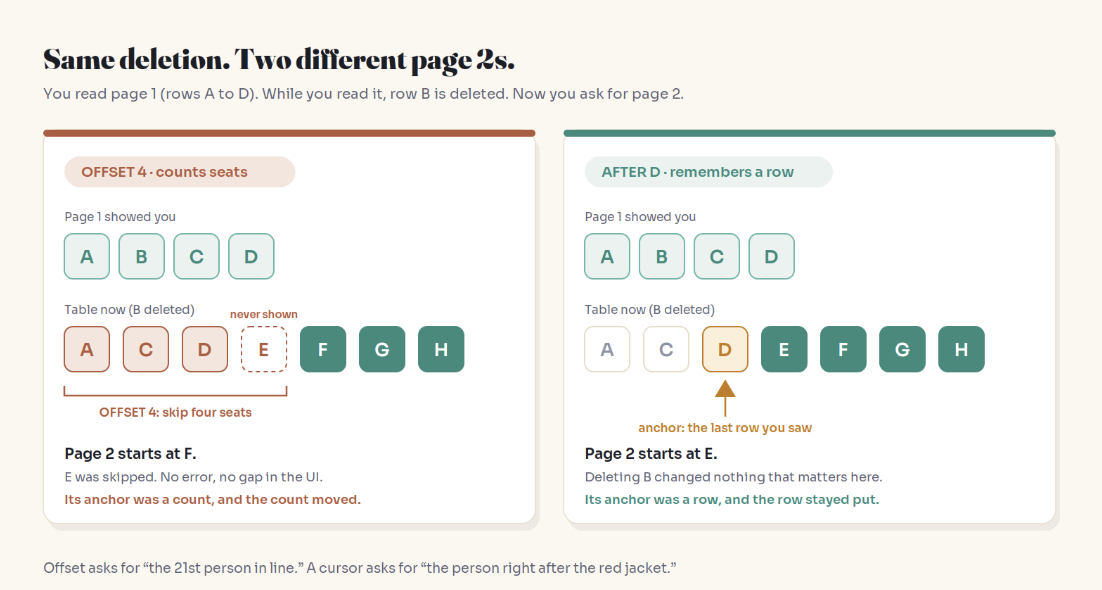
A cursor fixes OFFSET's problem only if the red jacket is a reliable landmark. That gives you four questions.
Pagination is only as stable as the thing it's anchored to.
The Anchor Test
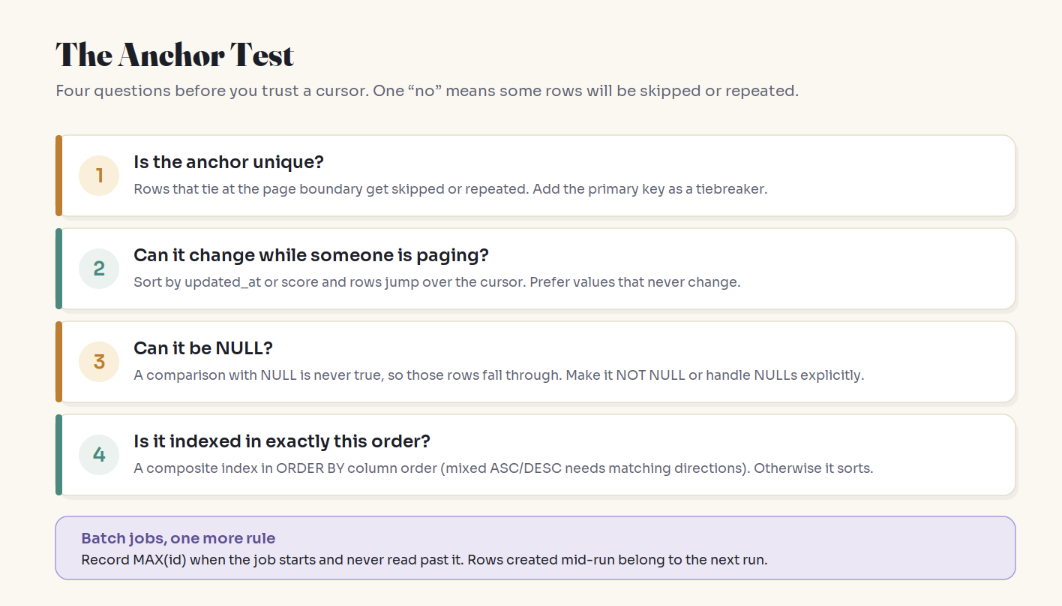
Unique? Timestamps tie. With
created_at < :cursor, the rest of a tied group at the page boundary is excluded forever. With<=, rows repeat, and if more rows share one value than fit on a page, the next page is the same page forever. Add the primary key as a tiebreaker.Immutable while paging? A cursor on
updated_atorscorelets rows move past it: edited rows jump behind the reader, demoted rows reappear ahead.Never NULL? Comparisons with NULL produce unknown, which
WHEREtreats as false. Depending on where your database sorts NULLs, those rows are either unreachable or become a NULL cursor that matches nothing.Indexed in this exact order? You need a composite index whose columns follow the
ORDER BY, or the database sorts everything before it can seek.
Keyset pagination recipes
PostgreSQL
Row-value comparison handles ties in one expression and can use the composite index:
CREATE INDEX idx_orders_created_id ON orders (created_at DESC, id DESC);

SELECT id, created_at, total
FROM orders
WHERE (created_at, id) < (:last_created_at, :last_id)
ORDER BY created_at DESC, id DESC
LIMIT 50;
(created_at, id) < (a, b) means "an earlier timestamp, or the same timestamp with a smaller id."
MySQL
MySQL's optimizer has a long history of handling row-constructor inequalities poorly, and its own documentation suggests rewriting them as plain conditions for better index use. Use the expanded form:
SELECT id, created_at, total
FROM orders
WHERE created_at <= :last_created_at
  AND (created_at < :last_created_at OR id < :last_id)
ORDER BY created_at DESC, id DESC
LIMIT 50;
The leading <= gives the optimizer a clean range on the index; the parenthesized part settles ties. Check EXPLAIN for a range scan rather than a full index scan.
Laravel
// Feeds and APIs: keyset under the hood. Order must be unique, columns non-null.
$orders = Order::orderByDesc('created_at')
    ->orderByDesc('id')
    ->cursorPaginate(50);

// Batch jobs that update what they read: seek by id, never by offset.
Invoice::where('status', 'pending')
    ->chunkById(1000, function ($invoices) {
        foreach ($invoices as $invoice) {
            $this->send($invoice); // marks it 'sent'
        }
    });
Laravel's documentation spells out both halves of this: chunk() results can change unexpectedly if you update records while chunking (use chunkById() or lazyById()), and cursorPaginate() requires a unique ordering and doesn't support columns with null values.
Rails
max_id = Invoice.maximum(:id)

Invoice.where(status: "pending").find_each(batch_size: 1000, finish: max_id) do |invoice|
  send_invoice(invoice)
end
find_each forces primary-key order (your custom order is ignored), and finish: freezes the upper bound so the job doesn't chase rows inserted mid-run.
Three safe patterns for batch jobs
Seek by primary key. WHERE status = 'pending' AND id > :last_id ORDER BY id LIMIT 1000. Your own updates can't shift you, because you're seeking past an id instead of counting rows.
Freeze the upper bound. Record MAX(id) when the job starts and add AND id <= :max_id_at_start. Rows created mid-run belong to the next run, and the job is guaranteed to finish.
Always read page one. If processing a row removes it from the result set, the correct offset is always zero. Keep taking the first 1,000 pending rows until none are left. The trap: a row that fails and stays pending sits at the front forever and the job loops on it. Use this only if every failure path moves the row out of the set (for example, status = 'failed').
Before re-running a job to catch skipped rows, make sure the work is idempotent. A re-run is only safe if processing a row twice is harmless.
Designing cursor tokens for an API
Two rules: make the cursor opaque so clients can't build or edit it, and include the sort definition so a cursor issued for one ORDER BY can't be replayed against another.
import base64, json

SORT = "created_at:desc,id:desc"

def encode_cursor(row):
    payload = {"s": SORT, "v": [row["created_at"].isoformat(), row["id"]]}
    return base64.urlsafe_b64encode(json.dumps(payload).encode()).decode()

def decode_cursor(token):
    payload = json.loads(base64.urlsafe_b64decode(token))
    if payload["s"] != SORT:
        raise ValueError("cursor was issued for a different sort order")
    return payload["v"]
Base64 is opacity, not security. If clients must not tamper with cursors, sign them.
When OFFSET is fine
OFFSET has the cost everyone mentions: PostgreSQL's docs note that skipped rows still have to be computed inside the server, so a deep offset does work only to discard it. But cost isn't always the deciding factor. OFFSET is a reasonable choice when the result set is small and bounded, the data changes slowly compared to how fast people page through it, and humans genuinely need page numbers or "jump to page 37." An internal admin table of a few hundred records fits. Public feeds, sync APIs, and batch jobs don't.
Key Takeaways
Every page is anchored to something. If the anchor can move, rows get skipped or repeated, and nothing raises an error.
OFFSET anchors to a position, which shifts with every insert, delete, or update ahead of it, including your own job's updates.
A non-unique
ORDER BYcan produce inconsistent pages even with zero writes.Cursors only hold if the anchor is unique, immutable while paging, non-null, and indexed in the same order.
For batch jobs: seek by primary key, freeze the upper bound at start, and treat "offset zero" as safe only if failures leave the set.
In code review, ask: what is this page anchored to, and can it move?
FAQ
What is the difference between offset and cursor pagination?
Offset pagination asks the database to skip a number of rows (LIMIT 50 OFFSET 100). Cursor pagination, also called keyset pagination, asks for rows that come after the last row you saw (WHERE (created_at, id) < (:last_created_at, :last_id)). Offset anchors to a position; a cursor anchors to a row's values.
Why does OFFSET pagination skip or duplicate rows?
Because OFFSET recounts from the top on every request. If rows ahead of your position are inserted, deleted, or stop matching the WHERE clause between requests, the position now points somewhere else. Inserts cause duplicates; deletions and status changes cause skips.
Is cursor pagination always consistent?
No. It's only as stable as its anchor. Cursors on non-unique columns drop or repeat tied rows, cursors on mutable columns like updated_at drift as rows move past them, and NULL sort values fall out of every comparison. Use a unique, immutable, non-null, indexed sort key.
Why is OFFSET slow on large tables?
The database still has to produce and discard every skipped row before returning your page, so cost grows with depth. A keyset query uses an index to seek directly to the boundary, so page 5,000 costs about the same as page 2.
How do I paginate a batch job that updates the rows it reads?
Never use OFFSET. Seek by primary key (id > :last_id), freeze the upper bound with MAX(id) captured at start, and use framework helpers built for it, such as Laravel's chunkById() or Rails' find_each. If processing removes rows from the result set, re-reading page one also works, as long as failures leave the set too.
Can I use cursor pagination with page numbers or total counts?
Not directly. A cursor only knows how to reach the next page, so "jump to page 37" isn't possible, and totals need a separate COUNT query. If users need page numbers on a small, slow-changing dataset, OFFSET is a reasonable trade-off.
Related reading
Your Database Transaction Didn't Save You From This Bug: correct queries, broken by concurrent writes
You Added an Index. Your Query Is Still Slow.: why the composite index has to match your sort
Your Worker Read the Past. Then It Saved It.: the other silent correctness bug in background jobs
Why Your App Is Fast in Dev and Dying in Production: the same "fine with 40 rows" trap
Start Here: the full Simply Explained map
The bottom line
The batch job in the repro didn't fail because of bad SQL. It failed because "skip the first 1,000" kept meaning something different every time the job changed the data. Pick an anchor that stays put, and pagination becomes boring again.
A pagination bug never says "error." It says "done."
Adam Jaber is a software engineer who writes Simply Explained: complex topics, made simple. No jargon, no hype.