Your LLM Limits Were Tuned in English: A Multilingual Token Budget Audit
max_tokens, history windows, rate limits, input caps and RAG chunks all shrink for Hindi, Tamil and Arabic users. Here's how to measure and fix it.
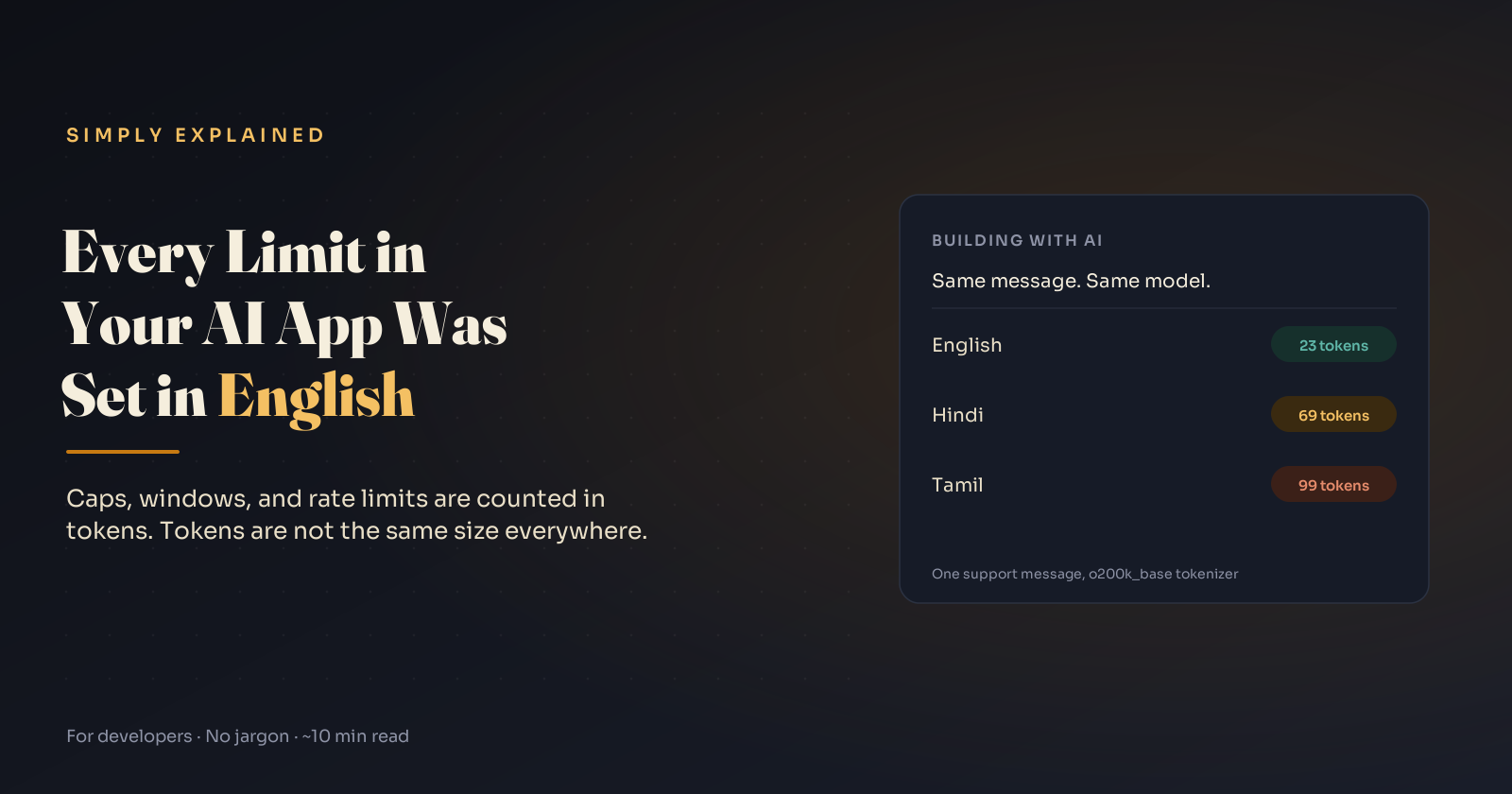
Here's a small puzzle. Take the same three-sentence support message in English and in Arabic. The Arabic version is shorter: 86 characters against 109. On OpenAI's GPT-4-era tokenizer, it still costs 64 tokens against 23.
Now Japanese. It says the whole thing in 46 characters, less than half the English. On the GPT-4o tokenizer it costs 31 tokens against English's 23.
If your app caps input at 2,000 characters, you've just set three different limits, none of which you chose.
TL;DR: LLM limits are counted in tokens, and the number of tokens needed to say the same thing changes a lot by language. If you tuned max_tokens, memory windows, rate-limit capacity, character caps or RAG chunk sizes on English traffic, your non-English users get a smaller product: cut-off replies, shorter memory, earlier throttling. Your English tests won't catch it.
The measurement
One support message ("My order arrived damaged. Please send a replacement or refund my payment. I have attached a photo of the box."), translated, counted with two of OpenAI's published encodings:
| Language | Characters | cl100k_base (GPT-4 era) | o200k_base (GPT-4o era) | vs English (o200k) |
|---|---|---|---|---|
| English | 109 | 23 | 23 | 1.0× |
| Spanish | 109 | 36 | 32 | 1.4× |
| Malay | 130 | 39 | 34 | 1.5× |
| Arabic | 86 | 64 | 30 | 1.3× |
| Japanese | 46 | 43 | 31 | 1.3× |
| Hindi | 114 | 123 | 69 | 3.0× |
| Tamil | 158 | 214 | 99 | 4.3× |
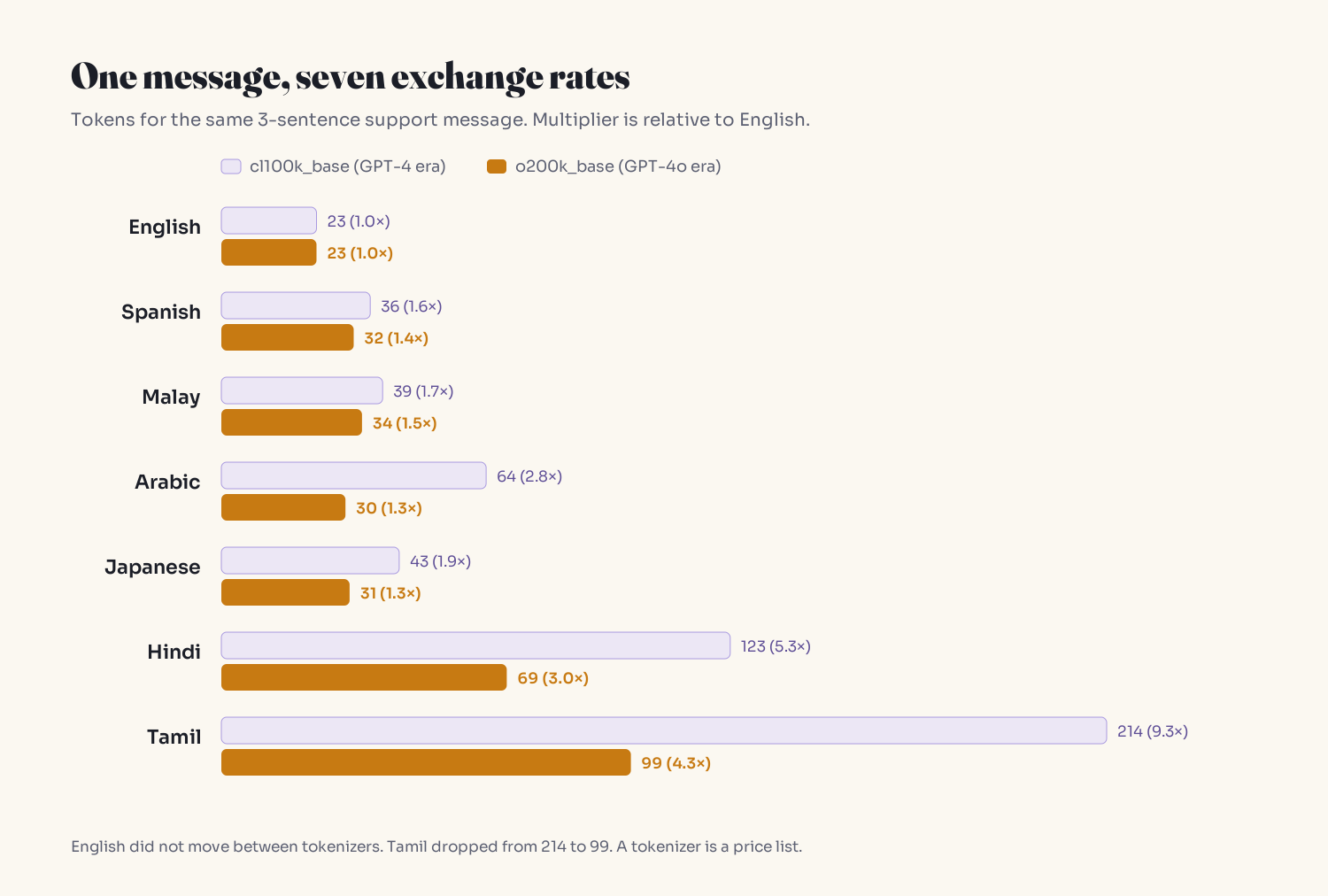
This is one short message, so treat the ratios as an example, not constants. The research agrees on the direction: Petrov et al. (NeurIPS 2023) found translations of the same text can differ in token length by up to 15×, and Ahia et al. (EMNLP 2023), studying OpenAI's API across 22 languages, found speakers of many supported languages are overcharged while also getting weaker results.
Reproduce it (the gpt-tokenizer package bundles OpenAI's encodings, so it runs offline):
// npm install gpt-tokenizer
const o200k = require('gpt-tokenizer/cjs/encoding/o200k_base');  // GPT-4o era
const cl100k = require('gpt-tokenizer/cjs/encoding/cl100k_base'); // GPT-4 era

const samples = {
  English: "My order arrived damaged. Please send a replacement or refund my payment. I have attached a photo of the box.",
  Hindi: "मेरा ऑर्डर टूटा हुआ पहुँचा। कृपया बदले में दूसरा भेजें या मेरा भुगतान वापस करें। मैंने डिब्बे की एक फ़ोटो लगाई है।",
  // add real messages from your own logs, per language
};

for (const [lang, text] of Object.entries(samples)) {
  console.log(lang, [...text].length, 'chars',
    cl100k.encode(text).length, 'cl100k', o200k.encode(text).length, 'o200k');
}
Two things stand out. English didn't change between tokenizers (23 and 23), while Tamil dropped from 214 to 99. A tokenizer is a price list, and a model upgrade reprices every language separately. And these are OpenAI encodings only: Anthropic, Google and open-weight models use their own tokenizers. Measure with the counter for the model you run.
Where it breaks: six limits
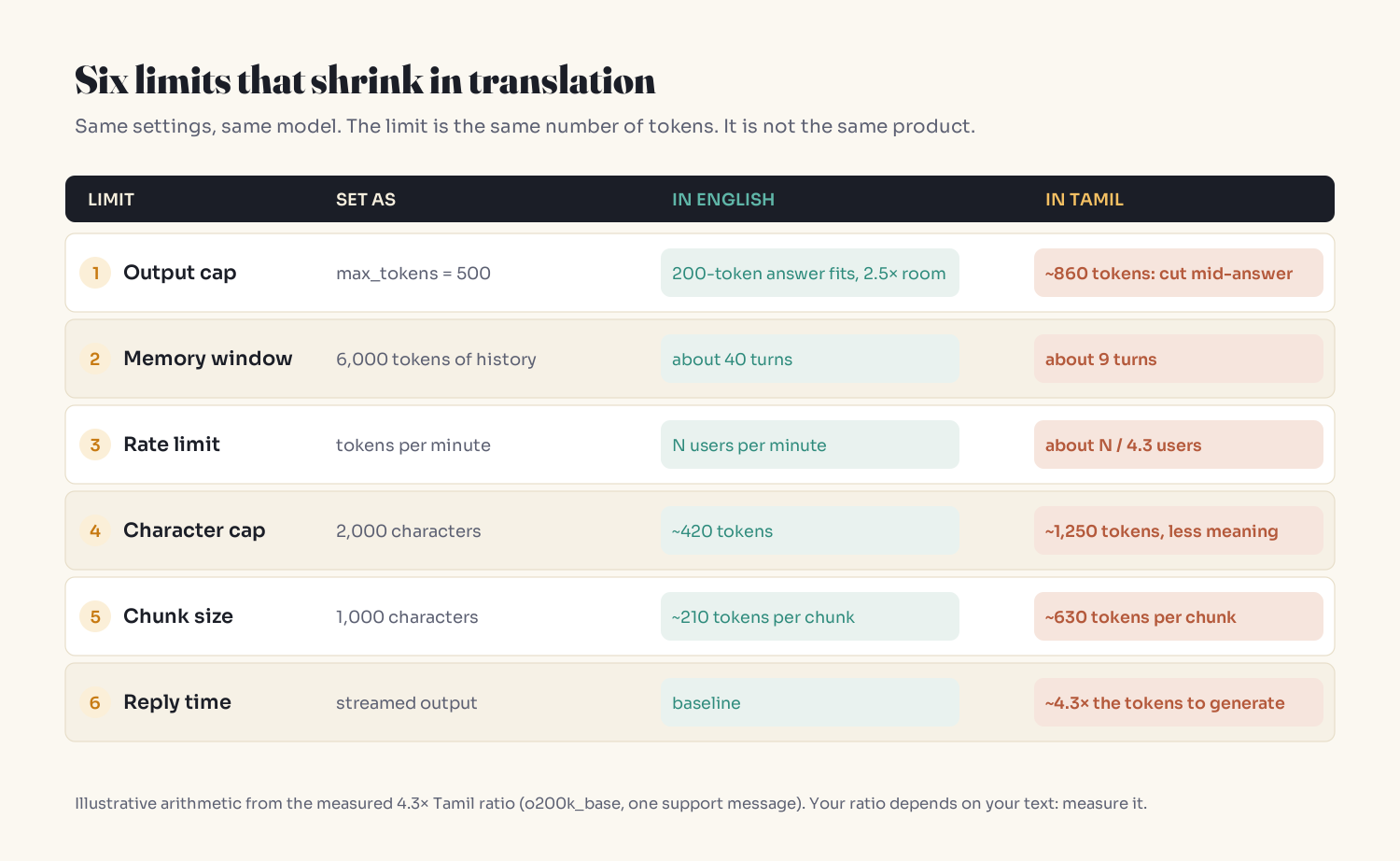
All arithmetic below uses the measured 4.3× Tamil ratio.
1. max_tokens truncates non-English replies first
English replies average 200 tokens; you set max_tokens=500 for 2.5× headroom. The Tamil equivalent needs ~860 and gets cut. The response is still HTTP 200. The only signal is the stop reason (finish_reason == "length" on OpenAI, stop_reason == "max_tokens" on Anthropic). Check it on every call and log tokens with a locale tag:
from openai import OpenAI

client = OpenAI()

class TruncatedReply(Exception):
    pass

def reply(messages, locale, max_tokens):
    resp = client.chat.completions.create(
        model=MODEL,
        messages=messages,
        max_tokens=max_tokens,  # newer models use max_completion_tokens
    )
    choice = resp.choices[0]
    log.info("llm_call", extra={
        "locale": locale,
        "input_tokens": resp.usage.prompt_tokens,
        "output_tokens": resp.usage.completion_tokens,
        "finish_reason": choice.finish_reason,
    })
    if choice.finish_reason == "length":
        raise TruncatedReply(locale)  # never ship half an answer silently
    return choice.message.content
On Anthropic's SDK the same fields are resp.usage.input_tokens, resp.usage.output_tokens and resp.stop_reason.
2. Token-based history windows forget sooner
A 6,000-token rolling history holds ~40 English turns of 150 tokens, and ~9 Tamil turns. Users experience it as "the model is worse in Tamil." It's your window.
3. Tokens-per-minute capacity drops with language mix
If you sized capacity on English traffic, a Tamil-heavy hour hits the same TPM ceiling with roughly a quarter of the users. It shows up on graphs as a traffic spike.
4. Character caps are wrong in both directions
A 2,000-character cap is ~420 tokens of English, ~1,250 of Tamil (holding less meaning, since Tamil needed 158 characters to say what English said in 109), and ~1,350 of Japanese (holding more). Cap in tokens server-side; show a friendly character counter in the UI if you like, but don't enforce with it.
5. RAG chunks sized in characters overflow
A 1,000-character chunk is ~210 tokens of English and ~630 of Tamil. Top-k retrieval fills a fixed context budget 3× faster, and an embedding model's per-input token limit can be exceeded in one script but not another (depending on the library, that errors or truncates silently). Pack whole sentences by token count instead:
const { encode } = require('gpt-tokenizer/cjs/encoding/o200k_base');

// Pack whole sentences into chunks by token count, not character count.
// Add sentence enders for your scripts (e.g. Arabic ؟).
function chunkByTokens(text, maxTokens = 400) {
  const sentences = text.match(/[^.!?।。]+[.!?।。]*\s*/gu) || [];
  const chunks = [];
  let cur = '', curTokens = 0;
  for (const s of sentences) {
    const t = encode(s).length;
    if (cur && curTokens + t > maxTokens) {
      chunks.push(cur.trim());
      cur = '';
      curTokens = 0;
    }
    cur += s;
    curTokens += t;
  }
  if (cur) chunks.push(cur.trim());
  return chunks; // one sentence longer than maxTokens stays one oversized chunk
}
Use the tokenizer that matches your embedding model, not necessarily your chat model.
6. Output latency scales with output tokens
Generation is one token at a time, so a 4.3× longer answer takes noticeably longer to finish streaming. Timeouts and slow-response alerts tuned on English fire on Tamil users first.
Budgeting per locale
The simplest fix is to size everything for the most expensive language you support. The trade-off: a higher global max_tokens also raises the worst case for runaway English replies. Per-locale budgets are tighter:
# Exchange rates measured on YOUR traffic (tokens relative to English).
EXCHANGE_RATE = {"en": 1.0, "es": 1.4, "hi": 3.0, "ta": 4.3}
BASE_MAX_TOKENS = 500  # tuned on English replies

def max_tokens_for(locale: str) -> int:
    # Unknown language: assume the most expensive one you've measured.
    rate = EXCHANGE_RATE.get(locale, max(EXCHANGE_RATE.values()))
    return int(BASE_MAX_TOKENS * rate)
Detect locale from the text, not the account setting. People often type in a different language from their UI, and romanized text (Hindi in Latin script, for example) tokenizes differently from the native script. Measure it as its own entry.
Other levers, each with a cost:
- English system prompt, local-language replies. Cheaper fixed prefix on every call; test that tone and accuracy hold. Combine with prompt caching and a stable prefix.
- Translate to English first. Fewer tokens, but two extra hops, more latency, and names, honorifics and legal wording can break. Reasonable for internal bulk jobs, rarely for the reply a customer reads.
- Pick models on your users' text. Compare cost per answer across your languages, not cost per token.
- Decide who pays. A flat "100 messages a month" plan costs you several times more for some locales. Absorbing that can be the right call. Not knowing isn't.
The Exchange Rate Audit
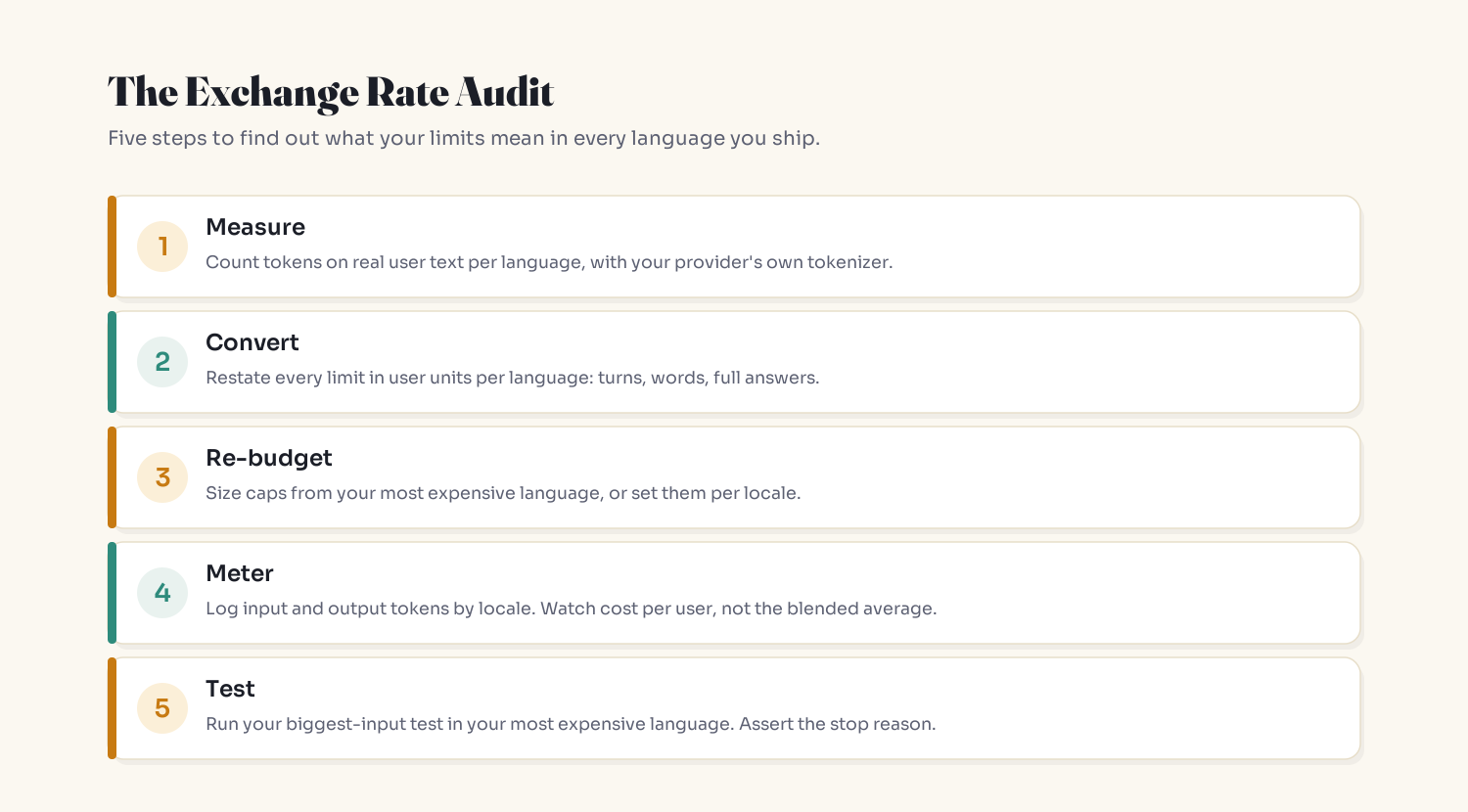
- Measure: token ratio to English per language, on real messages, with your provider's tokenizer.
- Convert: restate every limit in human units per language ("a full answer", "9 turns", "600 words").
- Re-budget: resize anything that converts to something you'd never ship on purpose.
- Meter: log input/output tokens by locale; review cost and latency per locale, not blended.
- Test: one fixture with your biggest input in your most expensive language.
import pytest

BIGGEST_INPUTS = {
    "en": "fixtures/longest_ticket.en.txt",
    "ta": "fixtures/longest_ticket.ta.txt",  # your most expensive language
}

@pytest.mark.parametrize("locale", BIGGEST_INPUTS)
def test_biggest_input_finishes(locale):
    text = open(BIGGEST_INPUTS[locale], encoding="utf-8").read()
    result = run_support_reply(text, locale=locale)  # your app's entry point
    assert result.finish_reason == "stop"            # not "length"
    assert result.output_tokens < max_tokens_for(locale)
    assert result.cost_usd < COST_BUDGET[locale]
Run it on every model upgrade, since a new tokenizer changes every rate at once.
Key Takeaways
- Token counts for the same meaning vary widely by language: in one measured message, Tamil took 4.3× the English tokens on o200k_base and 9.3× on cl100k_base.
max_tokens, history windows, TPM capacity, chunk sizes and timeouts are all token budgets, so all of them shrink for expensive languages.- Character caps measure neither cost nor meaning; enforce limits in tokens.
- Truncation returns HTTP 200. Check
finish_reason/stop_reasonon every call. - A tokenizer change reprices each language separately; benchmark models on your users' text.
- If your biggest test input isn't in your most expensive language, you've only tested English.
FAQ
Why do non-English languages use more tokens in LLMs?
Tokenizers learn their vocabulary from text that is heavily weighted toward English and a few other high-resource languages. Frequent sequences get long, efficient tokens, while text in less-represented scripts is split into shorter pieces, sometimes below a single visible character with byte-level tokenizers.
How many more tokens does Hindi or Tamil use than English?
It depends on the tokenizer and the text. In the support message measured above, Hindi used 3.0× and Tamil 4.3× the English tokens on OpenAI's o200k_base, and 5.3× and 9.3× on the older cl100k_base. Research across larger datasets has found differences up to 15× for some language pairs. Measure your own users' text.
Does max_tokens cut off non-English responses sooner?
Yes, if the cap was tuned on English. The same answer needs more tokens in a high-ratio language, so it reaches the cap earlier. The API still returns success; the stop reason (length or max_tokens) is the only signal.
Should I write my system prompt in English for a multilingual app?
It's a common and often reasonable choice, because the system prompt is paid on every call and English is usually cheapest. Test that tone and accuracy in each reply language hold before relying on it, and keep the prefix stable so prompt caching can reuse it.
How do I count tokens for a language before sending a request?
Use the tokenizer that matches your model: tiktoken or gpt-tokenizer for OpenAI encodings, or your provider's token-counting API or library for other models. Every API response also reports input and output token usage, which is the most accurate source for real traffic.
Is translating to English before calling an LLM cheaper?
Usually in tokens, but it adds two translation steps, extra latency and a second place for errors, and it can lose names, honorifics, tone and precise wording. It can suit internal bulk processing; for customer-facing replies, measure quality before adopting it.
Related reading
- Why AI can't count the R's in "strawberry": how tokens work underneath all of this
- Why AI forgets what you said: the context-window budget, before the language multiplier
- Prompt caching for AI agents: keeping the fixed part of the prompt cheap
- RAG explained: where chunk sizes come from
- Start here: a plain-English map to understanding AI
The bottom line
You can't change your provider's vocabulary. You can make sure your own limits know about it.
A limit you only tested in English is an English feature.
Get one of these in your inbox each week: subscribe to Simply Explained.
Adam Jaber is a software engineer who writes Simply Explained: complex topics, made simple. No jargon, no hype.
About the author
- I'm a senior software engineer. I write Simply Explained, a plain-English breakdown of how AI and software actually work, and the quiet ways they break: AI fixes that hide bugs, agents that pick the wrong tool, health checks that take down healthy servers. One symptom, one analogy, one fix per piece. New here? Start with the pinned Start Here guide, or get one breakdown a week by email.
Comments
Join the discussionNo comments yet. Be the first to comment.