The Lock Queue: Why a 2 ms ALTER TABLE Can Freeze Production
Reproduce it with three SQL sessions, then fix it with lock timeouts, retries, and the three clocks of a safe migration.
You can watch this outage happen on your own machine in about a minute. All it takes is three database sessions and an ALTER TABLE that, on its own, finishes in milliseconds.
Most zero-downtime migration advice is about making schema changes run faster: concurrent index builds, avoiding table rewrites. That matters. But the outage most teams eventually hit has a different shape. The migration barely runs at all. It waits, and every query that arrives after it waits too.
TL;DR: A migration's worst case isn't its runtime. It's the age of the oldest transaction on the table, because a waiting
ALTERblocks every query behind it. Cap the wait withlock_timeout(Postgres) orlock_wait_timeout(MySQL), retry with backoff, and check for long transactions before you migrate.
Reproduce the lock queue in three sessions
Open three psql sessions against any database with an orders table.
-- Session 1: a transaction that read the table and is still open
BEGIN;
SELECT * FROM orders LIMIT 1;
-- leave this session alone
-- Session 2: the "instant" migration
ALTER TABLE orders ADD COLUMN notes text;
-- hangs
-- Session 3: an ordinary read, the kind your app runs constantly
SELECT count(*) FROM orders;
-- also hangs
Now go back to session 1 and run COMMIT;. Sessions 2 and 3 complete almost immediately.
Session 3 never conflicted with session 1. Two reads can share a table all day. It got stuck because it arrived after the ALTER.
MySQL behaves the same way. Its own online DDL documentation walks through this exact three-session example: an open transaction holds a metadata lock, the ALTER waits for it, and a later SELECT is blocked by the pending exclusive lock. In SHOW FULL PROCESSLIST, both waiting sessions show Waiting for table metadata lock.
What's actually happening
Every query takes a lock on the tables it touches. Reads take a shared one (ACCESS SHARE in Postgres, a shared metadata lock in MySQL), and many can hold it at once.
Most ALTER TABLE forms need an exclusive lock. In Postgres that's ACCESS EXCLUSIVE, which conflicts with everything, including plain SELECT. MySQL's online DDL still takes an exclusive metadata lock briefly at the start and again when it commits the new definition. "Instant" shortens the hold. It doesn't remove the need to get in.
Then comes the fairness rule. Once an exclusive request is waiting, new requests that conflict with it queue behind it. Otherwise a steady stream of reads could starve the ALTER forever. The Postgres pg_dump docs describe the chain plainly: the exclusive request queues behind a shared lock, and any other access to the table then queues after the exclusive request.
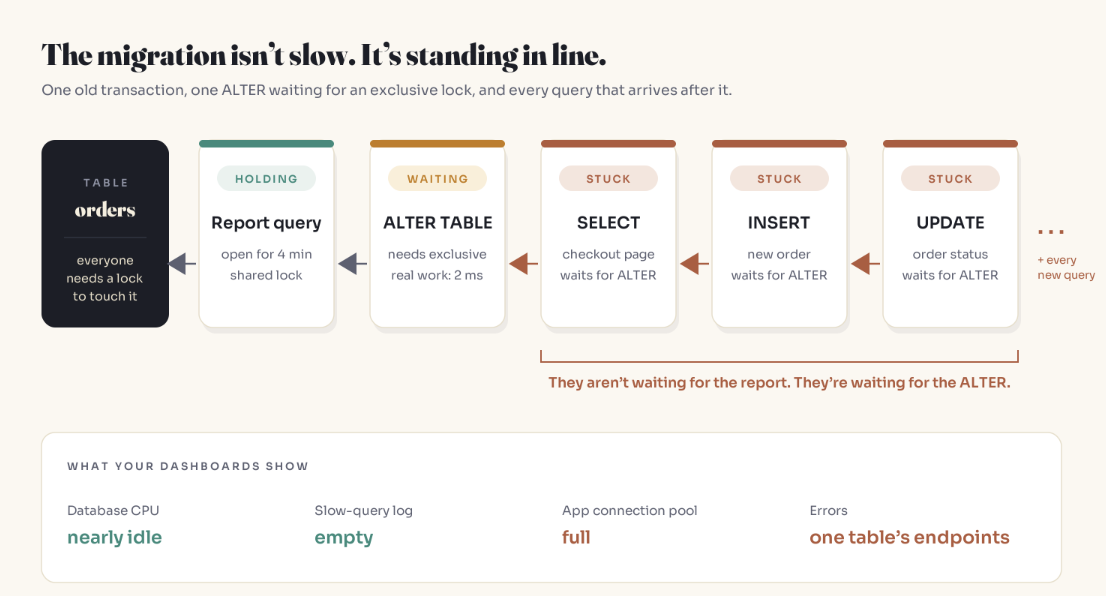
So a change that needs the table for 2 ms can stall traffic for as long as the slowest transaction ahead of it.
Confirm it on a live system
In Postgres, pg_blocking_pids() reports both kinds of blocking: a process holding a conflicting lock, and a process ahead of you in the queue with a conflicting request. That second kind is the giveaway.
SELECT pid,
       pg_blocking_pids(pid) AS blocked_by,
       now() - query_start   AS waiting_for,
       left(query, 50)       AS query
FROM pg_stat_activity
WHERE cardinality(pg_blocking_pids(pid)) > 0;
Run it during the repro and session 3 lists session 2, the ALTER, as its blocker. Not the open transaction. The reads are waiting on the migration.
In MySQL, look for pending metadata locks:
SELECT OBJECT_NAME, LOCK_TYPE, LOCK_STATUS, OWNER_THREAD_ID
FROM performance_schema.metadata_locks
WHERE OBJECT_SCHEMA = DATABASE()
ORDER BY LOCK_STATUS;
Why staging never catches it
The repro needed session 1: a transaction that stayed open. Development and staging rarely have one. Production nearly always does:
a report or export scanning the table for minutes
code that opens a transaction, then makes an HTTP call before committing
a batch job or backfill running in one long transaction
a backup (the
pg_dumpdocs describe this collision directly)
That's also why "migrate at 3 a.m." is weaker advice than it sounds. 3 a.m. is when backups and batch jobs run.
When it happens, the symptoms point the wrong way: CPU near idle, nothing finishing slowly yet, app connection pools full, and errors limited to one table's endpoints. It looks a lot like connection pool exhaustion, and client retries can push it into the self-sustaining loop described in metastable failures. Unlike a deadlock, nothing detects it: a deadlock is a cycle the database can break, while a queue is just a line.
Fix 1: cap the wait
Check the defaults first. Postgres lock_timeout defaults to 0, which disables it. MySQL lock_wait_timeout defaults to 31536000 seconds: one year.
-- Postgres
SET lock_timeout = '3s';
ALTER TABLE orders ADD COLUMN notes text;
-- MySQL
SET SESSION lock_wait_timeout = 3;
ALTER TABLE orders ADD COLUMN notes VARCHAR(500), ALGORITHM=INSTANT;
A migration that times out while waiting has changed nothing, because it never acquired the lock. That makes "give up and retry" the safest failure available. (Naming ALGORITHM=INSTANT in MySQL has a second benefit: the statement errors instead of silently falling back to a slower algorithm.)
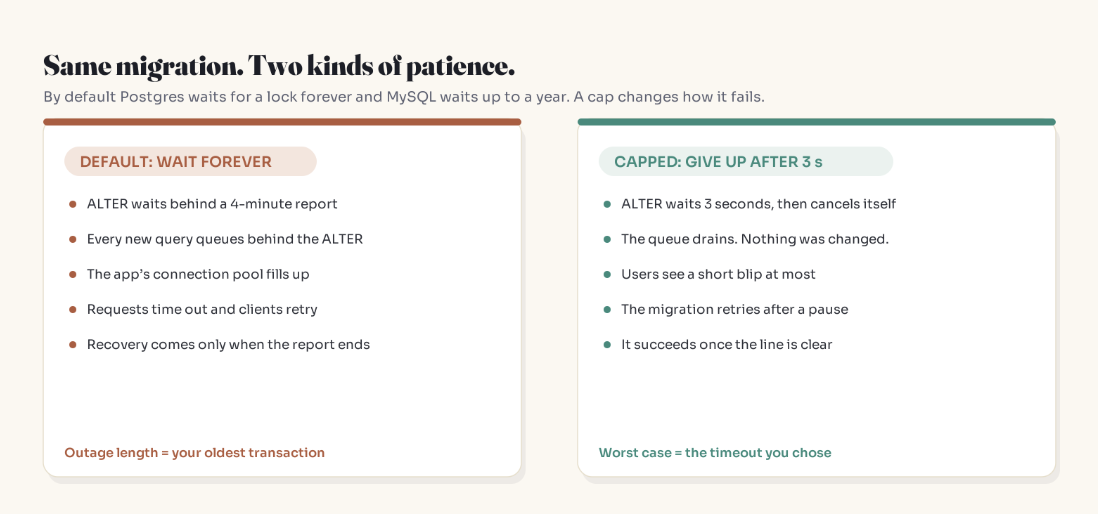
Postgres won't retry for you, so wrap it. A minimal sketch with psycopg 3:
import random
import time

import psycopg


def run_ddl(dsn: str, sql: str, attempts: int = 6) -> None:
    for attempt in range(attempts):
        try:
            with psycopg.connect(dsn, autocommit=True) as conn:
                conn.execute("SET lock_timeout = '3s'")
                conn.execute(sql)
            return
        except psycopg.errors.LockNotAvailable:
            # back off with jitter so the retry lands after the blocker ends
            time.sleep(min(60, 2 ** attempt) + random.uniform(0, 1))
    raise RuntimeError("Never got the lock. Find the long transaction first.")
Some tools, such as pgroll, build this loop in.
Three things to plan for once you add a timeout:
Migrations must be safe to rerun. If statement two times out, the retry can't choke on statement one.
The pipeline must treat a lock timeout as "retry later," not "broken." Otherwise someone raises the timeout until the error goes away.
Repeated timeouts are a finding. Some transaction on that table never ends. Fix it rather than waiting longer for it.
Fix 2: check the line before you join it
Before migrating a busy table, look at the oldest open transactions. That number is your worst-case wait.
-- Postgres
SELECT pid, state, now() - xact_start AS open_for, left(query, 60) AS last_query
FROM pg_stat_activity
WHERE xact_start IS NOT NULL
ORDER BY xact_start
LIMIT 5;
-- MySQL (InnoDB)
SELECT trx_mysql_thread_id, trx_started,
       TIMESTAMPDIFF(SECOND, trx_started, NOW()) AS open_seconds
FROM information_schema.innodb_trx
ORDER BY trx_started
LIMIT 5;
And shrink the line from the application side: no network calls inside transactions, statement timeouts on reports (or run them on a replica), and in Postgres, idle_in_transaction_session_timeout to end sessions abandoned mid-transaction. It's off by default too.
The three clocks of a migration
Waiting is one of three independent ways a migration hurts production.
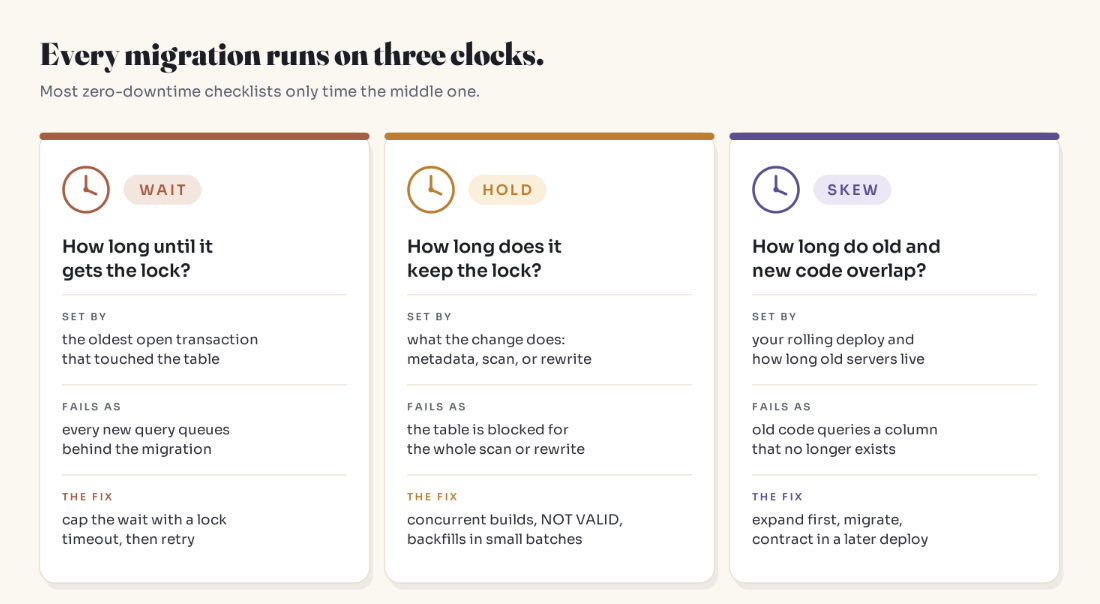
Wait: how long until the lock is granted. Set by other transactions, not by your migration. Covered above.
Hold: how long the lock is kept. Set by what the change does. For Postgres, per the ALTER TABLE and CREATE INDEX docs:
| Change | Lock taken | How long it's held |
|---|---|---|
ADD COLUMN with no default or a non-volatile default |
ACCESS EXCLUSIVE |
Metadata only, near instant |
ADD COLUMN with a volatile default, e.g. clock_timestamp() |
ACCESS EXCLUSIVE |
Full table rewrite |
ALTER COLUMN ... TYPE (most cases) |
ACCESS EXCLUSIVE |
Full table rewrite |
SET NOT NULL |
ACCESS EXCLUSIVE |
Full scan, skipped if a valid CHECK (col IS NOT NULL) exists |
ADD CONSTRAINT ... NOT VALID, then VALIDATE CONSTRAINT |
Brief strong lock, then SHARE UPDATE EXCLUSIVE |
Validation scans without blocking reads or writes |
CREATE INDEX |
SHARE (blocks writes) |
Whole index build |
CREATE INDEX CONCURRENTLY |
SHARE UPDATE EXCLUSIVE |
Doesn't block reads or writes; can't run in a transaction; a failure leaves an invalid index to drop |
One more Postgres rule: when an ALTER TABLE has several subcommands, it takes the strictest lock any of them needs. One change per statement.
Skew: how long old code and new schema coexist during a rolling deploy. A one-step column rename breaks every server still running the old code. Use expand and contract: add the new shape, write both, backfill, switch reads, and drop the old shape in a later deploy.
Pre-flight checklist
[ ] What lock does this statement need? (
ALTER TABLE: assume exclusive until the docs say otherwise.)[ ] What's the oldest open transaction on this table right now?
[ ] Is a lock timeout set, and does the pipeline retry when it fires?
[ ] Does the change scan or rewrite? If so, split it.
[ ] Do both the old and new application code work with this schema?
Key Takeaways
A waiting
ALTER TABLEblocks every later query on the table, even plain reads that never conflicted with the original blocker.A migration's worst case is the age of the oldest transaction in front of it, not its own runtime.
Postgres
lock_timeoutdefaults to disabled; MySQLlock_wait_timeoutdefaults to one year. Set your own.Timing out before the lock is granted changes nothing, so short timeouts plus retries are safe.
Track three clocks per migration: wait, hold, and skew. Most checklists only cover hold.
FAQ
Why does ALTER TABLE block SELECT queries?
Most ALTER TABLE forms need an exclusive lock, which conflicts with the shared lock every SELECT takes. While the ALTER is waiting for that lock, both Postgres and MySQL queue new conflicting requests behind it so the schema change isn't starved. The result is that plain reads wait for the migration, even before it has started.
What does "Waiting for table metadata lock" mean in MySQL?
A session needs a metadata lock on a table and can't get it. Usually a DDL statement is waiting for an open transaction that used the table, and later queries are waiting behind the pending DDL. Metadata locks are held until the transaction ends, so an idle but open transaction is enough to cause it.
What should lock_timeout be for a migration?
Short enough that users barely notice a stall: a few seconds is a common choice for busy tables. Pair it with retries and backoff. Set it per session for the migration, not globally; the Postgres docs advise against setting lock_timeout in postgresql.conf because it affects every session.
Is adding a column with a default safe on a large table?
In Postgres, a non-volatile default is stored in the table's metadata, so no rewrite happens. A volatile default such as clock_timestamp() rewrites the whole table. In MySQL, many column additions can use ALGORITHM=INSTANT. Either way, the statement still needs a brief exclusive lock, so it still needs a lock timeout.
Does CREATE INDEX CONCURRENTLY avoid the lock queue?
It takes SHARE UPDATE EXCLUSIVE, which doesn't conflict with normal reads and writes, so it doesn't stall traffic the way a waiting ACCESS EXCLUSIVE does. It is slower, can't run inside a transaction block, and leaves an invalid index behind if it fails.
How do I find what's blocking my migration?
In Postgres, query pg_stat_activity with pg_blocking_pids(pid) to see who blocks whom, and sort by xact_start to find the oldest open transaction. In MySQL, check SHOW FULL PROCESSLIST for Waiting for table metadata lock, performance_schema.metadata_locks for pending locks, and information_schema.innodb_trx for long-running transactions.
Related reading
Your Database Is Fine. Your App Is Dying Anyway.: the symptom this outage imitates
Two Transactions, Frozen Forever: The Deadlock Explained: the lock problem the database does detect
The Cause Was Fixed. The Outage Wasn't.: how retries keep an outage alive
Nobody Deployed Anything. Production Broke Anyway.: the other change path that skips review
The bottom line
Before you ask how long a migration takes, ask what it's going to wait for.
A 2-millisecond change is only as safe as the longest transaction standing in front of it.
Adam Jaber is a software engineer who writes Simply Explained: complex topics, made simple, with no jargon and no hype.
New here? Start Here for the map of everything. Get one of these in your inbox each week: subscribe to Simply Explained.
About the author
- I'm a software engineer who spends most days building systems that solve real problems. When I'm not shipping code, I'm either untangling a tricky problem or writing about what I learned doing it. Currently exploring AI on the side.
Comments
Join the discussionNo comments yet. Be the first to comment.
The Systems Behind the Software
Plain-English deep dives into the backend and system-design ideas that quietly run everything — caching, idempotency, databases, distributed systems, and the subtle bugs the obvious approach never prevents. No jargon, no hype. Each piece starts with a real production problem, builds the intuition, then shows how to actually get it right.