Is ChatGPT Really Private? What Actually Happens to Everything You Type
On a personal account your chats train the AI by default — and paying doesn't change it. Here's where your words go, and the 3-minute fix.

You've probably typed something into ChatGPT you wouldn't want read aloud. Here's where those words really go — and the 3-minute fix most people never make.
Think about the last few things you asked an AI chatbot.
Maybe a work email with a client's name in it. A weird health symptom. A contract you pasted in to "explain this." A rough patch you were talking through at 1am. It feels private — just you and a text box.
It isn't. And the gap between how private it feels and how private it actually is might be the most important thing you don't know about the tool you use every day.
The uncomfortable default
Here's the fact that surprises almost everyone: on a personal account, your conversations are used to train the AI by default. Not if you opt in — unless you opt out. And most people never find the setting.
The part that stings: paying for ChatGPT Plus or Pro doesn't change this. People assume the $20 buys privacy. It buys capability. Your chats on a paid personal plan are still, by default, training data for future models.
Paying for the AI makes it more powerful. It doesn't make it more private. Those are two different switches — and one of them is off.
None of this means the companies are villains, or that you should panic and delete everything. It means you should understand what you're actually using — because "it felt private" is not a plan.
Where your message actually goes
When you hit send, that's not the end of the journey. It's closer to the beginning.
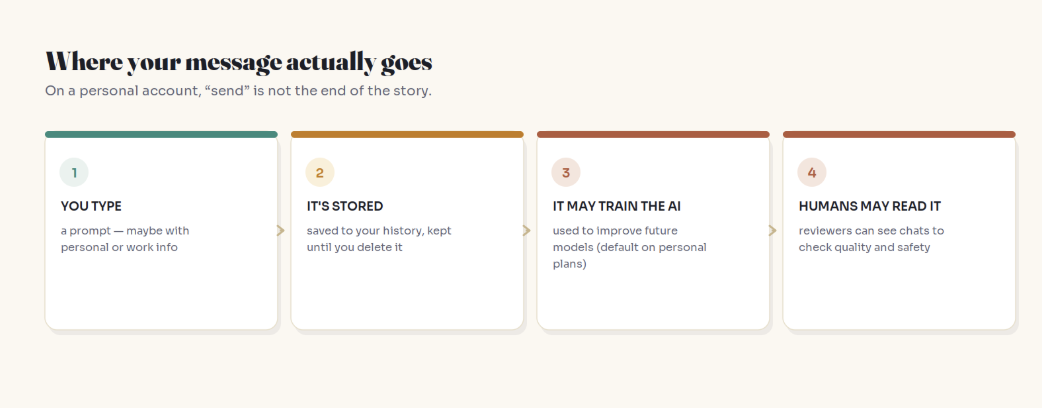
Your message gets stored — and it stays in your account until you actively delete it. It may be used to train future versions of the model. And in some cases, real human reviewers can read conversations to check whether the AI is responding well. They're under confidentiality agreements, but "a stranger might read this to grade the robot" is not most people's mental model of a private chat.
There's a genuinely useful analogy here: treat the chat box like a postcard, not a sealed letter. Most postcards nobody important ever reads. But you write them knowing someone could. That single shift in mindset prevents almost every AI privacy mistake.
The plot twist: your deleted chats aren't always gone
This is the part that turned AI privacy from an abstract worry into a real one for a lot of people in 2026.
In an ongoing legal case, a court ordered OpenAI to hand over roughly 20 million de-identified ChatGPT conversation logs. Sit with the scale of that. And earlier in the case, a preservation order even required keeping some chats users had deleted, overriding the normal purge.
The lesson isn't "the sky is falling." Most of us are not part of any lawsuit. The lesson is subtler and more durable: a legal hold can override a company's normal delete-and-forget timeline. "Delete" usually means deleted — but "usually" is doing quiet work in that sentence. Once you've typed something into someone else's system, you've handed over a copy, and you no longer fully control its fate.
The one habit that matters most
Before any settings, there's a single behavior that protects you more than everything else combined: be careful what you paste in the first place. Settings can fail, policies can change, courts can intervene — but a secret you never typed can never leak.
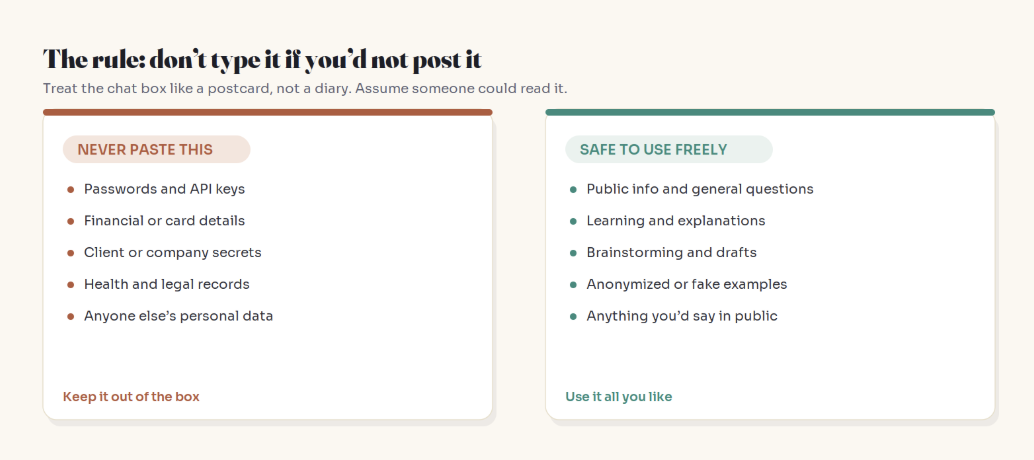
The rule of thumb is simple: if you wouldn't put it on a postcard, don't put it in the box. Passwords, API keys, card numbers, client and company secrets, health and legal records, and anyone else's personal data don't belong in a chatbot on a personal plan. Everything else — public questions, learning, brainstorming, drafts, anonymized examples — use freely and enjoy.
A quick tip that keeps AI useful without the risk: anonymize before you paste. Swap real names, numbers, and identifying details for placeholders. "Rewrite this email to [Client]" works exactly as well as using their real name — and it's no longer sensitive if it's stored.
Who needs to care most
Everyday personal use — recipes, trip planning, "explain this concept" — is genuinely low-risk, and I don't want to scare you off a useful tool. But a few situations deserve real attention:
Anyone using AI for work. Pasting client data, internal documents, or unreleased plans into a personal AI account can quietly violate your company's policies — and its clients' trust. Use the approved, private tool your employer provides for anything work-related. Developers. That "quick debug this" paste can include API keys, credentials, or proprietary code. Strip secrets first, every time. Anyone sharing someone else's information. A friend's medical situation, a colleague's details — it's not only your privacy you're spending. Consent matters. Parents and younger users. Kids treat chatbots like a trusted friend and overshare freely. A quick conversation about the postcard rule goes a long way. A quick example of how this bites
Picture a manager who pastes a sensitive note about a named employee into ChatGPT to "make it sound more professional." Harmless intent. But that person's name, the situation, and the manager's own company are now sitting in a system they don't control — potentially reviewable, potentially stored well beyond when they'd assume, and entered without the employee's knowledge.
Nothing dramatic has to happen for that to be a problem. A thirty-second convenience quietly created a data exposure that didn't need to exist. The fix costs nothing: swap the name for "[Employee]," keep the specifics vague, and you get the same polished result with none of the exposure.
Your 3-minute privacy checklist
Now the settings. This genuinely takes about three minutes, and you only need to do it once per app. Screenshot this and run it today.
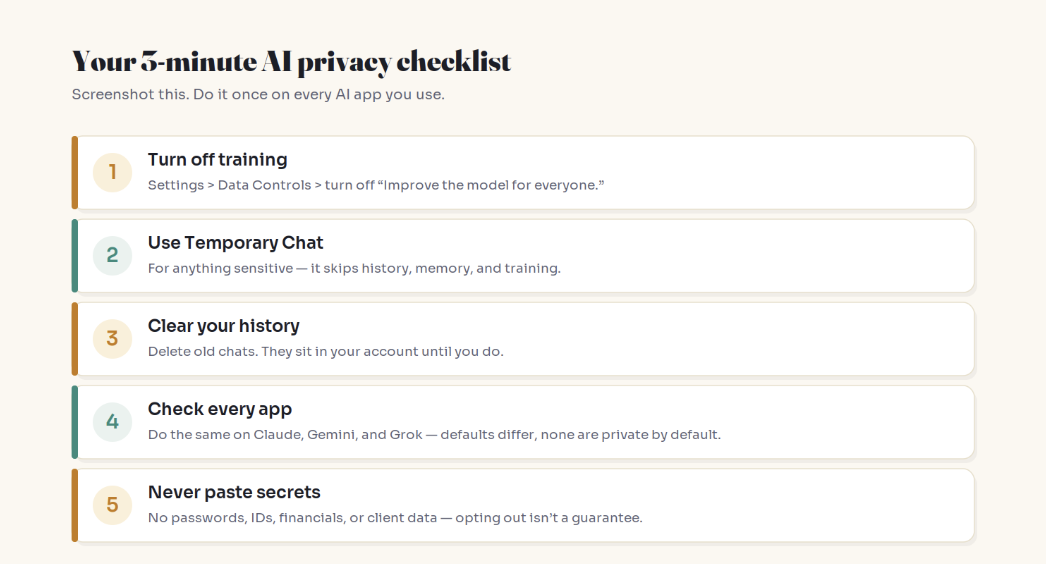
Turn off training. In ChatGPT: your profile, then Settings > Data Controls, and switch off "Improve the model for everyone." Your future chats stop being used for training.
Use Temporary Chat for anything sensitive. It doesn't save to your history, doesn't use memory, and isn't used for training. Think of it as incognito mode for AI.
Clear your history. Old conversations sit in your account until you delete them. Do a cleanup, and remember deletion typically finalizes after about 30 days.
Do it on every app. This isn't only a ChatGPT thing. Claude, Gemini, and Grok all have their own defaults — and none of them are private by default on personal plans. Change the setting on each one you use.
The catch nobody mentions: you can't un-train the past
Here's the honest limit of that off switch, and it matters. Opting out is forward-looking. It stops your future chats from being used. But anything already absorbed into a completed training run can't be pulled back out of the model.
Turning the toggle off is like closing the barn door — smart and worth doing, but it doesn't bring back whatever already wandered out. Which loops right back to the one habit that beats every setting: the safest data is the data you never shared.
Three myths worth clearing up "It's private because I'm logged into my own account." Your account keeps chats organized for you — it doesn't make them private from the company. Different thing entirely. "Paying for it protects my data." The most common misconception. A paid personal plan trains on your data by default just like the free one. (Business and Enterprise tiers are the ones that typically don't — a real reason companies buy them.) "The AI will blurt my secrets to other users." This is the fear people jump to, and it's the least likely part. Models learn broad patterns, not verbatim recall of your specific chat. The realistic risks are storage, human review, and legal holds — not the AI reciting your diary to a stranger. So… should you stop using AI?
No. That would be like refusing to use email because it isn't perfectly private. These tools are genuinely useful, and used sensibly, the risk for everyday use is low.
The goal isn't fear — it's informed use. Change the settings, keep the genuinely sensitive stuff out of the box, anonymize when it's easy, and enjoy the tool for everything else. That's the entire game. You get almost all of the benefit and almost none of the risk, and you're now in the small minority of people who actually know where their words go.
You don't need to fear AI to use it wisely. You just need to remember you're typing into someone else's computer.
Two minutes now beats a regret later
Most people will keep treating the chat box like a private diary, never touch the settings, and probably be fine — probably. You can do better than "probably" in about three minutes.
Open your AI app right now, flip the training setting off, and make a mental note of the postcard rule before your next prompt. Future you — the one who almost pasted something they shouldn't have — will be grateful.
Share this with the one person you know who tells ChatGPT everything (we all know one). And tell me in the comments: did you already know your chats train the AI by default — or is this the setting you're about to go change?
I write plain-English guides to AI, privacy, and productivity — no jargon, no hype. Follow along for the next one.