Why AI Coding Assistants Suggest Deprecated APIs (and How to Stop It)
It's not just the knowledge cutoff. The old API has more votes in the training data, and your own code decides which era the model writes in.
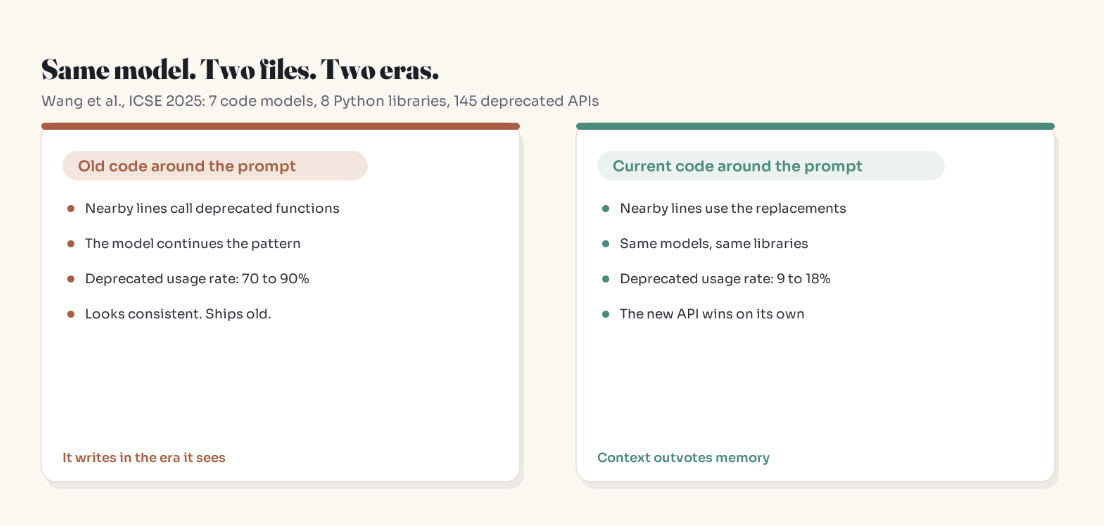
Same seven code models. Same eight Python libraries. Same 145 deprecated APIs.
In one setup, the models reached for the deprecated API in 70 to 90 percent of the relevant completions. In the other, 9 to 18 percent.
The only thing that changed was the code sitting around the cursor.
That result comes from a study presented at ICSE 2025 (Wang et al., LLMs Meet Library Evolution), and it's the most practical thing I know about why AI assistants hand you outdated code. The usual explanation, "the model has a knowledge cutoff", is true. It's also the part you can do the least about. This post covers the part you can.
TL;DR
- Models don't store when something was true. They absorb how often it was written.
- Old APIs have years of tutorials, answers and repos behind them. Their replacements have months. The old way wins on volume, even when the new way is in the training data.
- Models continue the era of the code around your prompt. Legacy context pulls answers into the past.
- You can't change the training data. You can change the context, the instructions file, and the CI checks.
Why the cutoff is only half the story
A knowledge cutoff is reported as a date, which suggests a clean line. Training data is more like a pile, and most of the pile is old.
A 2024 COLM paper (Cheng et al., Dated Data: Tracing Knowledge Cutoffs in Large Language Models) measured the effective cutoff of several open models: the version of a resource each model matches best, found by testing it against monthly snapshots. For several models it landed well before the reported cutoff. One dataset listed a 2023 Wikipedia dump, yet models trained on it matched Wikipedia as it looked around 2019.
Two causes, both mundane:
- Crawls carry old copies. A web crawl from a given year contains many older versions of the same pages; the authors found 2023 crawls holding document versions going back to 2016.
- Deduplication misses near-duplicates. Popular old text survives the filters and gets counted repeatedly.
Those were open research models, and every lab's pipeline differs. The underlying pressure doesn't: text about the old way of doing things has had longer to accumulate.
The archive vote
Picture an API through its life. Version 1 ships, and for years people write tutorials, answer questions, file issues and push code that uses it. Version 2 ships. In the months before a training snapshot, a migration guide and a few posts appear.
Freeze that and train on it. No fact gets a timestamp. Patterns that appear more often pull harder. Version 1 has had years to collect votes.
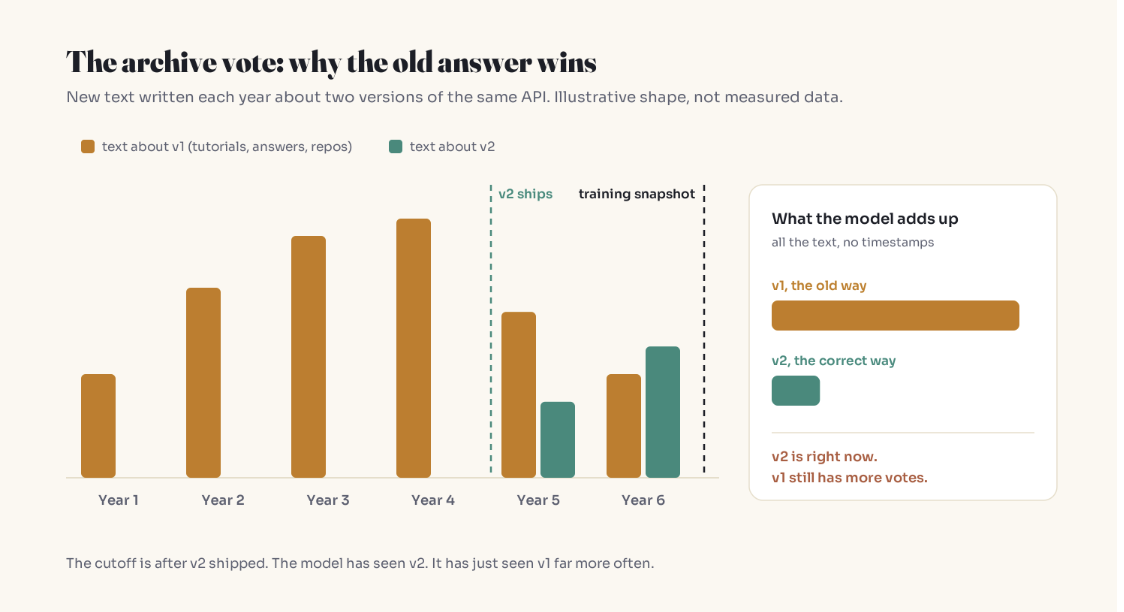
This predicts where it hurts most: changes made shortly before the cutoff. Something deprecated five years before training has been outvoted by newer text. Something deprecated six months before is still the minority view, even though it's technically "known".
Your context picks the era
Back to the ICSE study. The authors trace deprecated suggestions to two roots: deprecated usages are everywhere in public code, and models carry no record of which APIs were retired. Then the prompt does the rest. Models continue patterns, so a file full of old calls makes more old calls the most natural continuation.
The practical upshot:
- The assistant writes better code in your new service than your legacy one. Not because legacy is harder. Because legacy code is telling it what year to write in.
- Adding fresh docs helps, but so does removing the old signal or explicitly labeling it as legacy.
Why web search doesn't close the gap
Two reasons, both mechanical:
- The model usually decides whether to search. "What's the latest version of X?" looks time-sensitive. "How do I paginate with X?" doesn't, even when the answer changed last year.
- Retrieved text competes with priors. If results include an old tutorial or a page discussing both versions, the familiar pattern gets back in. Retrieval adds fresh text; it doesn't guarantee fresh text wins.
Fixes that work at the prompt level
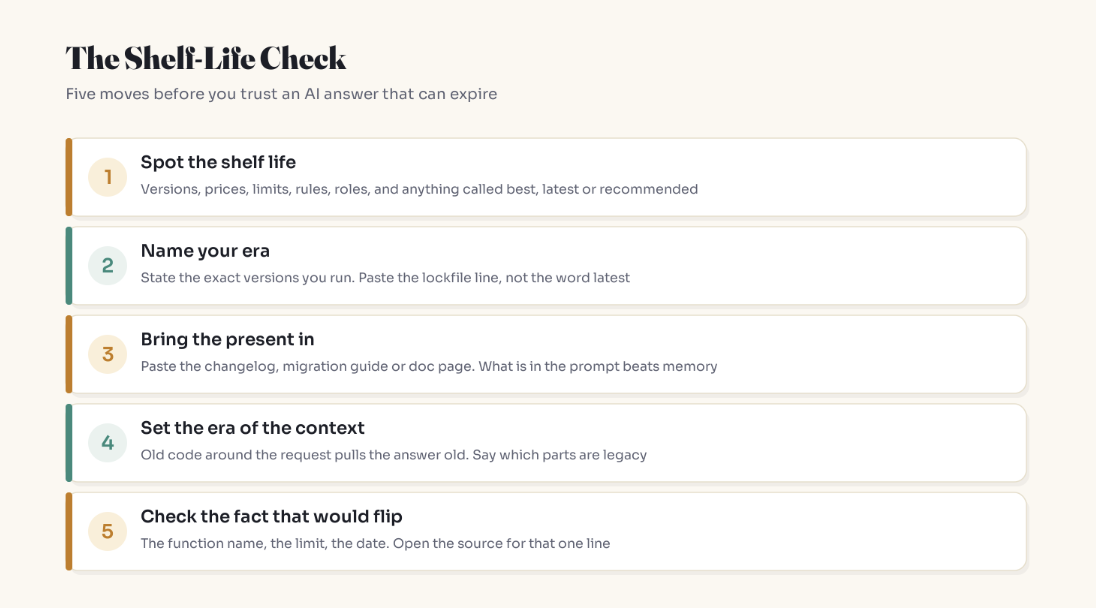
Name the era explicitly
Replace "the latest" with versions, and label legacy context:
Environment: Python 3.12, pandas 2.2 (lockfile line below).
The surrounding module uses deprecated pandas APIs. Treat it as legacy.
Write all new code with the current API only.
Here is one example of the pattern we use now: [paste]
If you're unsure a function still exists in 2.2, say so instead of guessing.
One current example in the prompt changes what "most natural continuation" means.
Paste the change, not the website
Paste the specific migration-guide section or changelog entry. What's in the context window outweighs training memory, but long context has blind spots, so keep it targeted.
Ask which version it assumed
"Which version are you assuming?" turns a hidden assumption into a visible one. Treat the reply as a claim to check against your lockfile, not as a readout of the model's internals.
Fixes that work at the team level
Pin versions where the assistant reads them
Most AI coding tools read a project-level instructions file (AGENTS.md, CLAUDE.md, .github/copilot-instructions.md, depending on the tool). Keep a short era block there:
## Versions (update in the same PR as any upgrade)
- Python 3.12, pandas 2.2, SQLAlchemy 2.0
- React 19, Next.js 15 (App Router only)

## Patterns we've moved away from
- No SQLAlchemy 1.x Query API in new code
- No Pages Router in new routes
Keep it short. A bloated instructions file gets diluted like any long prompt, and a stale one becomes a fossil with official authority.
Turn deprecation warnings into failures
Python projects with pytest can promote warnings to errors. Note that many libraries, pandas included, signal upcoming removals with FutureWarning, not only DeprecationWarning:
# pyproject.toml
[tool.pytest.ini_options]
filterwarnings = [
    "error::DeprecationWarning",
    "error::FutureWarning",
]
Expect to add targeted ignore entries for noisy third-party warnings you can't fix yet. For Node, run tests with node --throw-deprecation to turn runtime deprecation warnings into thrown errors.
Add one review question
"Which version is this written for?" Five seconds, and it catches code that looks right because it was right, once.
Migrate the examples first
Shared utilities, templates and the canonical example everyone copies are the files the assistant sees most. Modernize those early and they teach the current era on every read.
Key Takeaways
- The knowledge cutoff marks the newest text a model could have seen, not what it leans on.
- Frequency beats recency: the old API usually has far more training text than its replacement.
- The riskiest zone is the year just before the cutoff, where new answers exist but are outnumbered.
- In the ICSE 2025 study, outdated surrounding code pushed deprecated usage to 70 to 90 percent; current code kept it at 9 to 18 percent.
- Web search helps, but the model decides when to search and old pages compete with new ones.
- Pin versions in the instructions file, paste the specific changelog, fail CI on deprecations, and verify the one fact that would flip.
FAQ
What is an AI knowledge cutoff?
It's the date after which a model has no training data. Anything that happened later is unknown to the model unless it's given the information through search, retrieval or the prompt.
Why does AI suggest deprecated APIs even when the deprecation happened before its cutoff?
Because models learn from frequency, not timestamps. An API used for years has far more tutorials, answers and code behind it than its recent replacement, so the old pattern looks more "normal" to the model.
What is an effective knowledge cutoff?
It's the period a model's knowledge actually matches best, which research has found can sit well before the reported cutoff. Older copies of pages in web crawls and imperfect deduplication pull it backward.
Does turning on web search fix outdated AI answers?
Partly. The model often decides whether to search, so questions that don't sound time-sensitive may skip it, and retrieved pages can include outdated material that reinforces the old answer.
How do I stop AI coding assistants from using deprecated APIs?
State exact library versions, paste the relevant migration guide section, label legacy code as legacy, give one example of the current pattern, and fail CI on deprecation warnings so anything that slips through gets caught.
Does legacy code make AI write worse code?
It makes AI write older code. Models continue the patterns around the cursor, and a 2025 study found outdated surrounding code drove deprecated API usage to 70 to 90 percent of relevant completions.
Related reading
- Why AI Confidently Lies to You (And How to Never Get Fooled Again), the louder cousin of stale answers
- Why AI Forgets What You Said, and Why a Bigger Context Window Won't Fix It
- RAG Explained: How to Make AI Actually Use Your Data
- Why AI Feels Smarter About Topics You Don't Know
- Start Here: A Plain-English Map to Understanding AI
The bottom line
You can't change the archive a model learned from. You can change the vote it takes when it answers you: name your versions, bring the present into the prompt, and make the code around the request honest about what year it is.
The model can't feel time passing. Your prompt can tell it.
Adam Jaber is a software engineer who writes Simply Explained: complex topics, made simple. No jargon, no hype. Get one in your inbox each week → subscribe on Substack.
About the author
- I'm a software engineer who spends most days building systems that solve real problems. When I'm not shipping code, I'm either untangling a tricky problem or writing about what I learned doing it. Currently exploring AI on the side.
Comments
Join the discussionNo comments yet. Be the first to comment.
AI for Humans
AI explained in plain English, for people who aren't engineers and don't want to be. How it actually works, how to use it well, and how it's quietly changing work, privacy, and everyday life. Why AI confidently gets things wrong, whether ChatGPT is really private, how to spot AI fakes, what it means for your job, and how to use it without getting fooled or overwhelmed. No jargon, no hype — just clear answers to the questions everyone's actually asking.